Google Ads Keyword Match Types in 2026: What an Online Store Should Actually Pick
Most explanations of keyword match types are written as if you are setting up a Search campaign in an empty account. Three types, a few examples, done. If you run an online store, that picture is wrong.
Your budget does not only go to Search keywords. It also goes to Shopping and Performance Max, and those do not run on keywords at all. They run on your product feed.
That is exactly where almost every guide on this topic stops. They explain broad, phrase, and exact, and ignore that in an e-commerce account those keywords are constantly negotiating with your Shopping campaigns over who gets the click. Miss that interaction, and you end up optimizing a match type while your budget leaks somewhere else.
This article does two things. First, the match types as they actually work in 2026, not as they worked in 2019. Then the part the rest skip: how match types, Shopping, and your feed compete for the same search, and what that means for where you put your budget and your attention.
The three match types, and why the old definitions are wrong
A keyword match type decides how close a search has to be to your keyword before your ad enters the auction. There are three. The problem is not that people do not know them. The problem is that most definitions are years out of date.
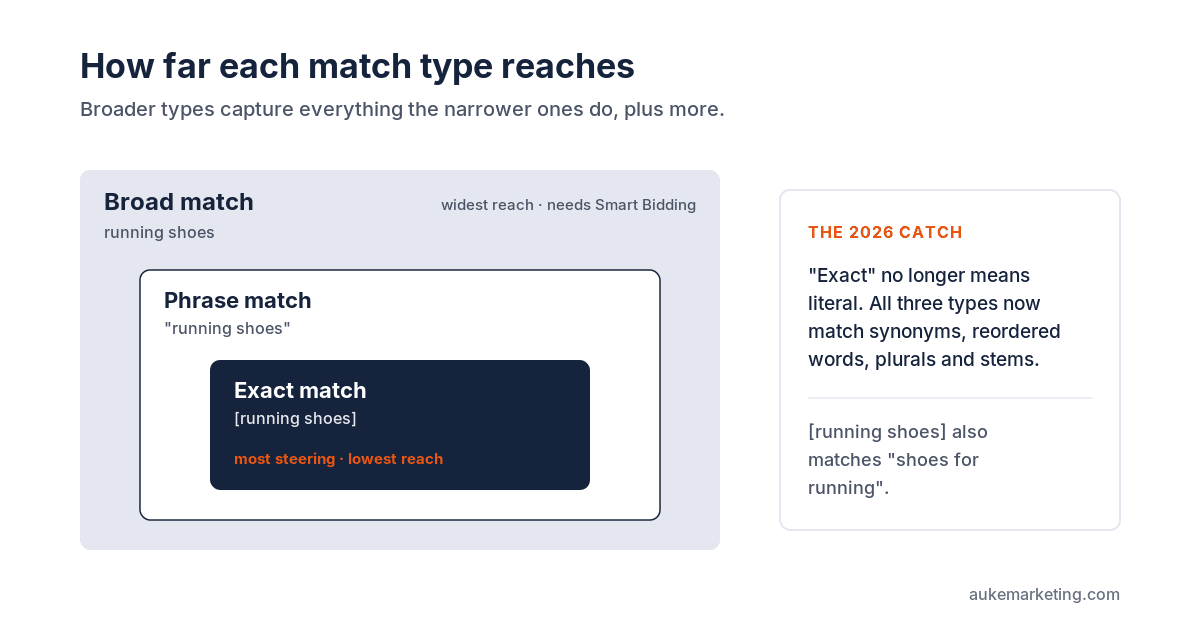
Broad match (no symbols, just running shoes) shows your ad on searches related to your keyword, including searches that do not literally contain it. This is the default match type Google assigns to every keyword. Google also uses the user's recent search activity, the content of your landing page, and the other keywords in your ad group to read intent.
Phrase match ("running shoes", in quotes) shows your ad on searches that include the meaning of your keyword. The meaning can be implied and the search can be a more specific form of it. More reach than exact, less than broad.
Exact match ([running shoes], in square brackets) shows your ad on searches with the same meaning or intent as your keyword. Of the three, exact gives you the most steering but the lowest reach.
So far, the official line. Here is what most articles leave out: the words "exact" and "phrase" no longer mean what they suggest.
Exact match used to mean exact. Literally the keyword you typed. Phrase match meant these words, in this order. That is over. Google now adds synonyms, reordered words, implied words, singular and plural forms, and stems to all three types. [running shoes] now also matches "shoes for running" and similar variants. Phrase match "running shoes" matches "best running shoes for men", but also synonyms Google judges relevant.
That is not a detail. It is the whole reason the old approach, hundreds of ad groups each holding a single keyword, no longer works. You are organizing around a distinction Google no longer makes internally. Most store owners only notice when they open their search terms report and see searches they assumed their match type would block.
The shift that actually matters: Google's system has moved from keyword matching to intent matching. It reads the intent behind a search, not the exact words. That means fewer keywords needed, ad groups organized by intent instead of by word variant, and your search terms report as your main control instead of your match type.
Broad match without Smart Bidding is throwing money away
One rule is not negotiable in 2026: only use broad match with Smart Bidding. Google says so itself, and it is not a sales line. Every search is different, and your bid per search has to reflect the context of that moment. Smart Bidding uses those signals to enter you only in the right auctions, at the right bid, for the right user.
Broad match without automated bidding still wastes budget. A concrete example I see often: a keyword like "blue running shoes" on broad match pulls in search terms like "running socks", "blue paint roller", and "shoe cleaning". The budget burns on those irrelevant clicks before anyone notices.
At the same time, broad match is far stronger than it was a few years ago. The machine learning behind it has genuinely improved. It is normal to find 30 to 40 percent more converting traffic with broad match plus Smart Bidding in an account that ran on phrase and exact for months. Its strength is discovering searches you would never bid on yourself.
The exception is accounts with very high cost per click. When a click costs 15 to 30 euros, intent changes with a few words and every mismatch costs you real money. There it is worth trading volume for accuracy and staying on phrase and exact.
Negative keywords work differently, and that is where it often goes wrong
Negative keywords tell Google when not to show your ad. They have their own match types, and those work differently from the positive ones. This trips people up, so it is worth getting right.
Negative keywords do not trigger synonyms or close variants. A negative keyword blocks only what is literally there. That is the point: you do not want Google guessing what you are trying to exclude.
- Negative broad (
men shoes): blocks searches that contain all the words, in any order. But not searches with only one of the words. - Negative phrase (
"men shoes"): blocks searches with those words in that order. - Negative exact (
[men shoes]): blocks only the exact search, no extra words. This is the default when you add a negative keyword.
The practical lesson: review your negative lists every quarter. An outdated list that accidentally blocks twenty valuable searches is invisible in your interface. You only see traffic that is not there.
The part nobody explains: match types fight with your Shopping campaigns
Up to here, this article is not that different from a good Search guide. Now the part that matters most for an online store and is missing from nearly every other explanation.
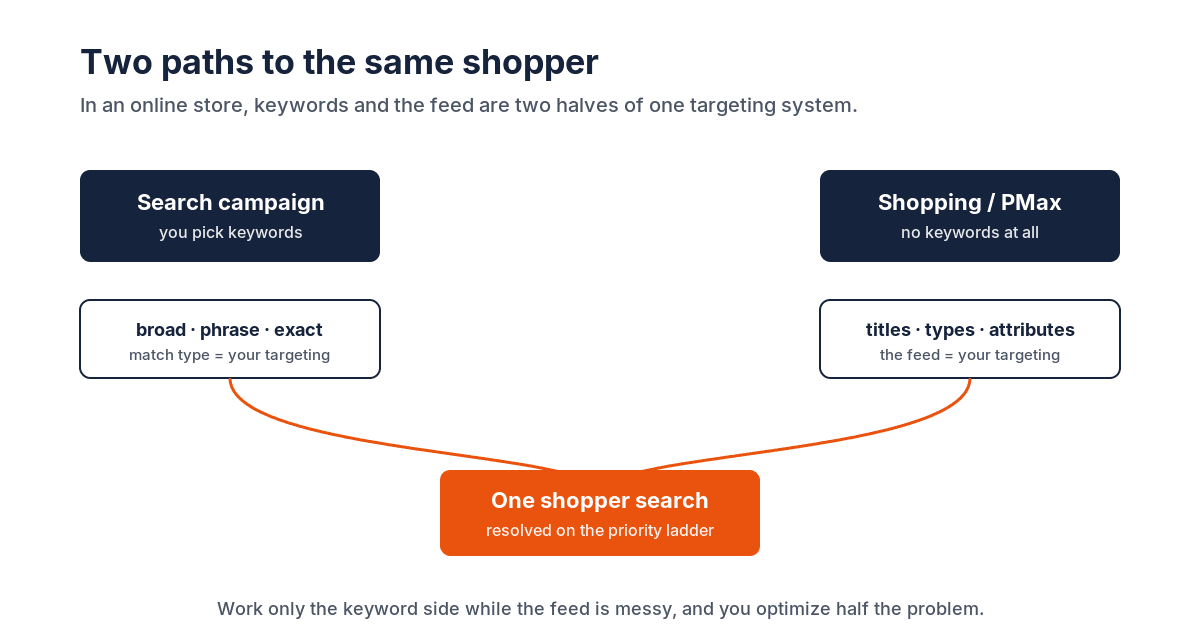
An online store rarely runs only Search keywords. You probably also run Shopping or Performance Max. And those campaigns do not use keywords. They pull products from your feed and match them to searches based on your product titles, types, and attributes. No broad, phrase, or exact. The feed is your targeting.
That means one shopper search, say "blue running shoes men", can in principle be matched by:
- your exact match keyword
[blue running shoes men]in a Search campaign, - your phrase or broad keyword in the same or another campaign,
- a Performance Max campaign pulling the same product from your feed.
Who wins? Google has a fixed priority ladder for this, and that ladder is what you really need to understand when you look at where your budget goes in an e-commerce account.
The priority ladder for identical searches:
- An exact match keyword identical to the search wins. An exact match keyword that literally matches the search term is prioritized over any broad or phrase keyword, and over Performance Max.
- Phrase and broad match keywords, or PMax search themes, that are identical to the search share priority. A PMax search theme identical to the search beats a phrase keyword that is not identical.
- Relevance. If a search could match several ad groups, Google's AI picks the most relevant.
- Ad Rank. If candidates tie on priority, the highest Ad Rank wins.
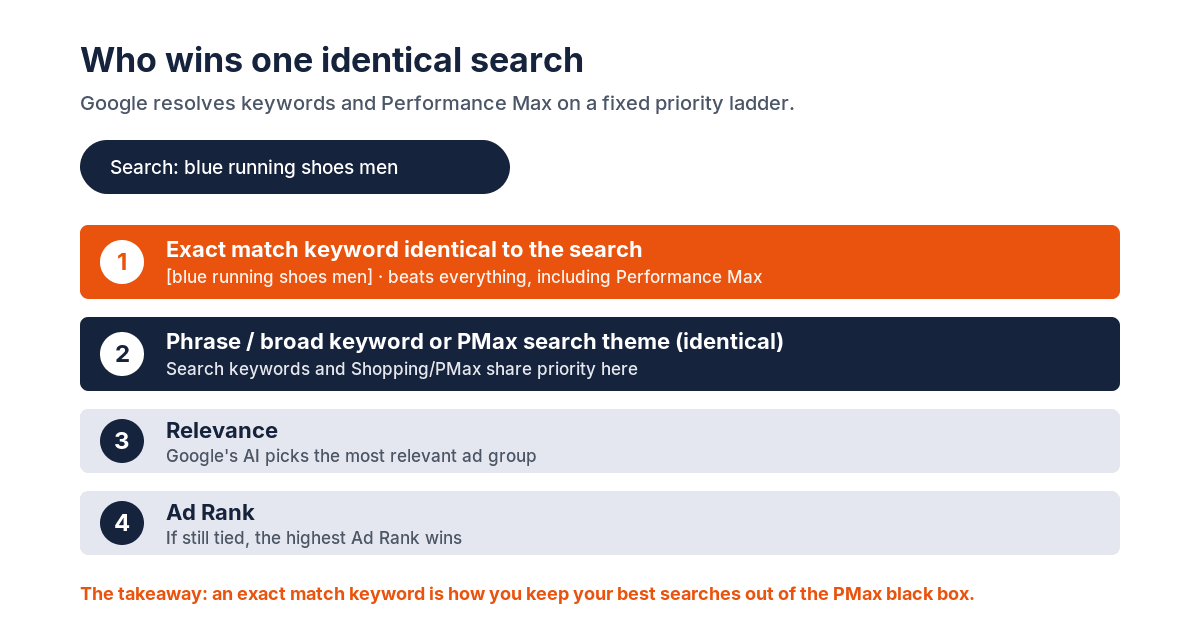
Read step one again. An exact match keyword identical to the search beats Performance Max. That is one of the few ways you still steer traffic in 2026 that PMax would otherwise absorb. If you want to be sure your best, highest-converting searches run through your Search campaign and not the black box of PMax, you set them as exact match keywords. Not because exact is more precise in the old sense, but because it sits at the top of the ladder.
The reverse: if you notice existing keywords suddenly showing in Performance Max instead of your Search campaign, it is usually an eligibility issue. Your Search campaign is capped by budget, the keyword has "low search volume" status, or the landing page or ad is disapproved. Those are not match type problems, but they look like one if you only watch your keywords.
This is the point a Search-only guide structurally misses: in an online store, "which match type do I pick" is the wrong question in isolation. The question is how your match types relate to your Shopping and PMax traffic, and whether your feed steers that traffic the right way. A messy feed with vague product titles lets PMax match on the wrong searches, and no match type in your Search campaign fixes that. The keywords and the feed are two halves of the same targeting. The Performance Max guide for ecommerce explains exactly which feed fields control that matching and how to fix them.
AI Max: the next step, and why you do not switch it on blindly
In May 2025 Google launched AI Max for Search, and it is being pushed hard. It is a campaign-level toggle that overrides your match type settings. AI Max does two things on top of your existing keywords. First, it treats all your keywords as broad match, regardless of what you set. Second, it adds keywordless matching: Google finds searches based on your landing page and ad assets, not your keywords. In practice it is Dynamic Search Ads bolted onto your Search campaign.
Google claims a 14 percent lift in conversions at equal cost per acquisition, and 27 percent for campaigns that run mostly on exact and phrase. Those are Google's numbers. Independent testing shows a more mixed picture: AI Max can override the standard match type hierarchy and assign impressions to different keywords than you would expect. That makes it harder to see what is working.
My line, and that of most serious advertisers: do not switch AI Max on blindly. If you already run broad match with Smart Bidding, the broad part of AI Max adds little, because broad match already does that. The keywordless part pulls searches from your landing pages, which sounds useful until you realize you cannot control what it picks up. And the biggest problem is reporting: AI Max muddies your search terms report, because the system reassigns impressions on its own logic. If you have to explain your results to a client or to yourself, that is a real problem.
If you do want to try it, Google gives you controls. Brand exclusions keep your ads away from specific brands. Brand inclusions do the opposite: they limit your matching to searches that include your brand term. And since 26 February 2026 there are text guidelines available globally: term exclusions (up to 25 words that may never appear in generated ad copy) and messaging restrictions (up to 40 natural-language rules on tone and content). Useful guardrails, but consider this: having to set up guardrails to stop a feature from doing damage tells you something about how ready it is.
The direction is clear. Google wants to replace keyword control with AI matching. Close variants got wider, phrase match got broader, broad match got better with Smart Bidding, and AI Max is the next step. The sensible answer is to meet Google halfway, not all the way. Broad match with Smart Bidding gives the system enough room to find relevant searches while you keep your keyword list as an anchor and your reporting readable.
How to pick the right match type
There is no best match type. The choice depends on where you stand. Four questions get you there.
Where are you in the campaign lifecycle? New ad group? Start with phrase match. It brings volume and stays reasonably targeted. After two to three months of data, refine with exact match on the proven winners.
How much conversion data do you have? New keywords with no history belong on phrase or broad. Keywords that have proven they convert get promoted to exact match, to lock in that traffic and put it at the top of the priority ladder.
How much budget room do you have? Tight budget (around 200 euros a day)? Avoid broad. More room (1000 euros a day or more) with months of data? Broad match with Smart Bidding can unlock scale. Just started at 50 euros a day? Phrase match, then exact on the winners.
How much time do you have to monitor? Broad match needs weekly reviews of your search terms report. Phrase every two weeks. Exact can stretch to monthly if it is stable. If you only look once a month, exact match is your only safe choice.
And for an online store there is a fifth question, the one the rest of the internet skips: does your feed steer your Shopping and PMax traffic the right way? You can set up your match types perfectly and still lose budget because PMax matches on the wrong searches through a sloppy feed. The keywords and the feed work together, or they work against each other.
The practical summary
For most online stores in 2026, a sensible setup looks like this. A core of exact match keywords on your brand and your proven, high-converting searches, to lock in that traffic and keep it above Performance Max. Alongside that, broad match with Smart Bidding for discovery and scale, with a weekly check of your search terms report. Phrase match as a safer starting point in new campaigns or accounts without data. Negative keywords to seal the leaks, reviewed every quarter. And AI Max only switched on deliberately, not because Google recommended it.
But the most important part, and where you get your real edge: treat your Search keywords and your product feed as one targeting system. They fight over the same searches, they follow the same priority ladder, and if you only work the keyword side while your feed is a mess, you are optimizing half the problem. Whoever sees the whole chain, from product title through feed to Merchant Center to the Shopping auction to Search priority, makes better decisions than whoever looks at match types in isolation. If you want that whole chain laid out from the ground up, start with the complete guide to Google Ads for ecommerce.
That is exactly the work I do for online stores: not optimizing one campaign setting, but getting the whole pipeline in order so your budget lands where it should. If you are stuck on how your keywords, your Shopping campaigns, and your feed interact, the free feed review is a good place to start.
Frequently asked questions
Which keyword match type should I use for my online store?
There is no single right answer. Start new campaigns on phrase match for controlled reach, then promote proven converting keywords to exact match. Use broad match only with Smart Bidding and a real spend budget. For most stores, a combination of exact (brand and top converters) and broad (discovery) works better than committing to one type across the board.
Does exact match still mean the exact keyword I typed?
No. Google updated exact match years ago and has kept widening it. Exact match now includes synonyms, reordered words, implied words, and singular or plural variants. [running shoes] can match "shoes for running." You still get tighter control than phrase or broad, and exact match sits at the top of the priority ladder, but it no longer blocks close variants.
How do keyword match types interact with Performance Max and Shopping?
A single search can be claimed by your Search keywords, a Shopping campaign, or Performance Max. Google resolves that with a fixed priority ladder: exact match keywords identical to the search win, then phrase or broad match and PMax search themes tied to the search, then relevance, then Ad Rank. This is why setting your best searches as exact match keywords is one of the few tools left to steer traffic away from PMax.
Why does my match type matter less than my product feed?
Your Shopping and Performance Max campaigns do not use keywords at all. They target through your product feed. If your feed has vague titles, wrong attributes, or missing data, PMax matches on the wrong searches regardless of what your Search keywords say. Match types and feed are two halves of the same targeting system. Getting one right while the other is a mess leaves half the problem unsolved.
When should I use broad match, and is it safe?
Broad match is safe only with Smart Bidding. Without it, broad match burns budget on irrelevant searches. With Smart Bidding and enough conversion data, it regularly finds 30 to 40 percent more converting traffic by discovering searches you would not bid on yourself. Avoid it if your cost per click is very high (15 to 30 euros or more per click), if you are just starting out, or if your budget is too tight to absorb a learning period.
About the author

Auke Jongbloed
Auke Jongbloed is a Google Shopping and product feed specialist. He builds a product feed manager for WooCommerce, and works directly with ecommerce store owners on Google Shopping and Performance Max setups via aukemarketing.com. Follow him on LinkedIn for more on Google Shopping and feed strategy.
Google Shopping account review
Find out exactly where your Shopping budget is leaking
I go through your campaigns, search terms, products, and feed settings and write up exactly where money is leaving -- ranked by recoverable spend, in plain language. From $297. No retainer, no commitment.
Get your account review