Google Ads for Ecommerce: The Complete 2026 Guide (With the Layer Most Guides Skip)
Picture an online store running around 15,000 euro a month through Google Ads. The owner does everything the guides say. Conversion tracking is on, there is a Performance Max campaign, a Shopping campaign, a few Search campaigns alongside. And still it does not add up. The traffic comes in, but the sales lag behind. The ROAS swings, the budget evaporates, and every month feels like starting over.
The reflex then is to turn the knobs you can see. Target up. Shift budget around. Add a campaign type. But the real brake almost never sits where most people look. It sits a layer deeper, in a place no "ultimate guide" treats as the foundation.
This is that guide, built differently. Not a list of every button in Google Ads, because that list is online a hundred times over and Google's own AI overview sums it up in three lines. This piece explains how Google Ads for an online store actually fits together, in what order you tackle it, and why most campaigns that "do not work" really fail on a layer almost nobody points to.
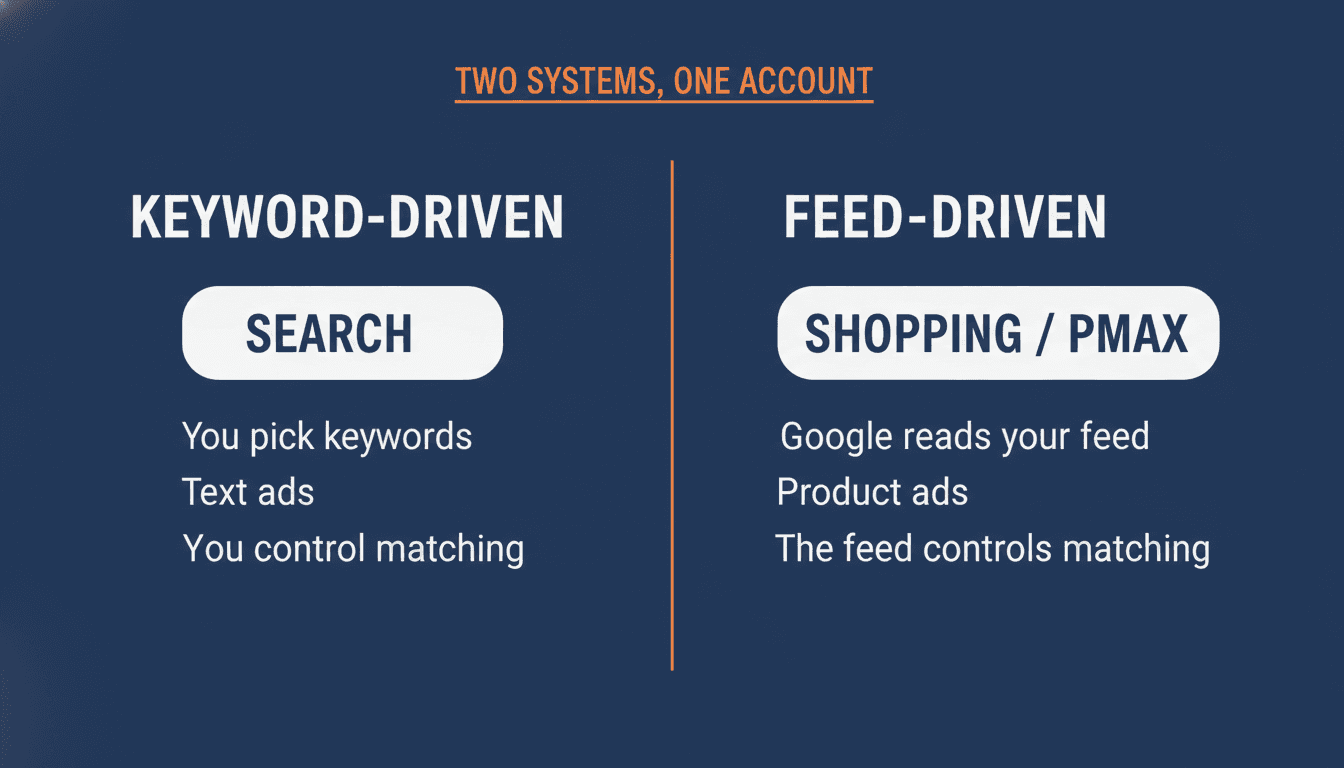
Google Ads for ecommerce is not a platform with knobs. It is two systems.
The first thing that helps: stop seeing Google Ads as one thing with a lot of settings. It is two fundamentally different ways to get found, living side by side in the same account.
The first system is keyword-driven. That is your Search campaigns. You pick keywords, Google matches searches to them, and your text ad shows above the search results. You decide what you want to be found for.
The second system is feed-driven. That is Shopping, Performance Max, and the shopping part of Demand Gen. Here you pick no keywords. You give Google your product data, and Google decides for itself which product shows for which search. Google confirms this in its own documentation: Shopping ads do not use your keywords, they use the product attributes from your Merchant Center feed to match a search to a product.
For most online stores, the bulk of revenue runs through that second system. The Shopping ad with your product photo, your price, and your store name catches the buyer at the exact moment they search for that product. That is the highest-intent traffic there is.
And here is the mistake that explains everything underneath. The feed-driven system has no keyword knob to turn. The feed is the knob. Your product data decides which searches you appear for, at what price you enter the auction, and what value Google assigns to each click. Most owners optimize the campaign structure on top, while the data underneath, the layer the system actually runs on, is rarely touched.
The feed is your foundation, not a setting
This is the layer every guide mentions and almost none explains. "Optimize your product feed" is everywhere, including in Google's own AI overview. But it gets treated as one loose item on a checklist, next to fifty others. For an online store the feed is not an item on the list. It is the foundation everything stands on.
Let me put the whole chain in one line, because that is exactly what nowhere gets explained completely:
Your product data goes into the feed. The feed goes to Merchant Center. Merchant Center feeds the Shopping and Performance Max auction. And in that auction your bid strategy decides who gets the click.
Every link hangs on the one before it. A fault at the front poisons everything behind it, and the sting is that you do not see the cause at the place where it goes wrong.
A few examples of what can be broken in that first link. Your product titles. For the feed-driven system, your titles are what keywords are for Search. A title like "Model X-200 Black" matches nothing, because nobody searches that way. "Wireless over-ear headphones black, noise cancelling" matches real searches. Google confirms that your product titles, prices, and availability decide when and where your Shopping ads appear. Bad titles are not a cosmetic problem. They decide whether you compete at all.
Then the required attributes. The Merchant Center product data specification has required fields, and errors in them cost you visibility. A missing or wrong [gtin] limits a product's visibility, Google confirms. A wrong [price] or [availability] leads to disapprovals. An online store with 800 products, 200 of them disapproved in Merchant Center, runs its full budget on a quarter of the catalogue without the campaign stats giving it away. Checking that by hand across a large catalogue is exactly the kind of work you can hand to AI; I put together a few free Claude skills for Google Ads, including a feed auditor that flags disapprovals and weak titles for you.
The chain, not the loose links. Most people treat feed and bidding as two separate worlds: you have the feed people and the campaign people. In a Google Ads account for ecommerce it is one chain. A weak product title changes which searches you appear for, and with that which clicks your bid strategy gets to see. You cannot tune the bidding honestly on data that already comes in crooked at the front.
This is why I never look at bidding and feeds separately, and why I build the tools at WP Marketing Robot the way I do: not to make a feed look pretty, but because a clean feed is the only base everything behind it can honestly calculate on.
The cause under the cause: why "traffic but no sales" is rarely a targeting problem
Go to any ecommerce forum and you see the same three lines come back. "I get traffic but no sales." "Smart Bidding cannot hit my margin, not even at 40 percent." "Google Shopping is burning my money." And the advice that always follows points at the visible layer: adjust your bid, lower your target, fiddle with your targeting.
It rarely sits in the targeting. That is the lesson from practice I see confirmed again and again, and it is exactly why that last layer matters so much.
Smart Bidding, whether you use Target ROAS or Maximize Conversion Value, runs on one thing: the predicted value of a click. Google predicts, for every search, how much a click is likely to be worth, and sets the bid accordingly. Google confirms this explicitly in its Smart Bidding documentation. And that prediction is only as good as the data you supply.
For an online store, that data comes from two sources, and both sit in the feed chain, not in your campaign settings.
The first is your conversion value tracking. Does your site send the real order value back to Google, or a fixed amount, or nothing? An example more common than you would think: a store sends a fixed conversion value of 50 euro on every purchase, because real order-value tracking was never set up correctly. To Google, every sale is now worth exactly the same, whether someone buys a 20 euro item or places a 300 euro order. The algorithm can no longer tell your valuable clicks from your worthless ones, because you are telling it they all earn the same. Put a bid strategy over that, and it steers on a made-up reality.
The second is the feed itself. Are your prices correct, are your products identified properly, can the right value be tied to the right click? A catalogue with wrong or missing prices gives Google the wrong margins to calculate with. The system then bids too high on products that earn less than it thinks, and too low on products that actually perform.
Then this happens: you lower your target nicely, you give it time, and it still does not work. Not because your target is wrong, but because it is steering on data that does not hold up. The visible problem was the campaign. The cause underneath was the feed or the value tracking.
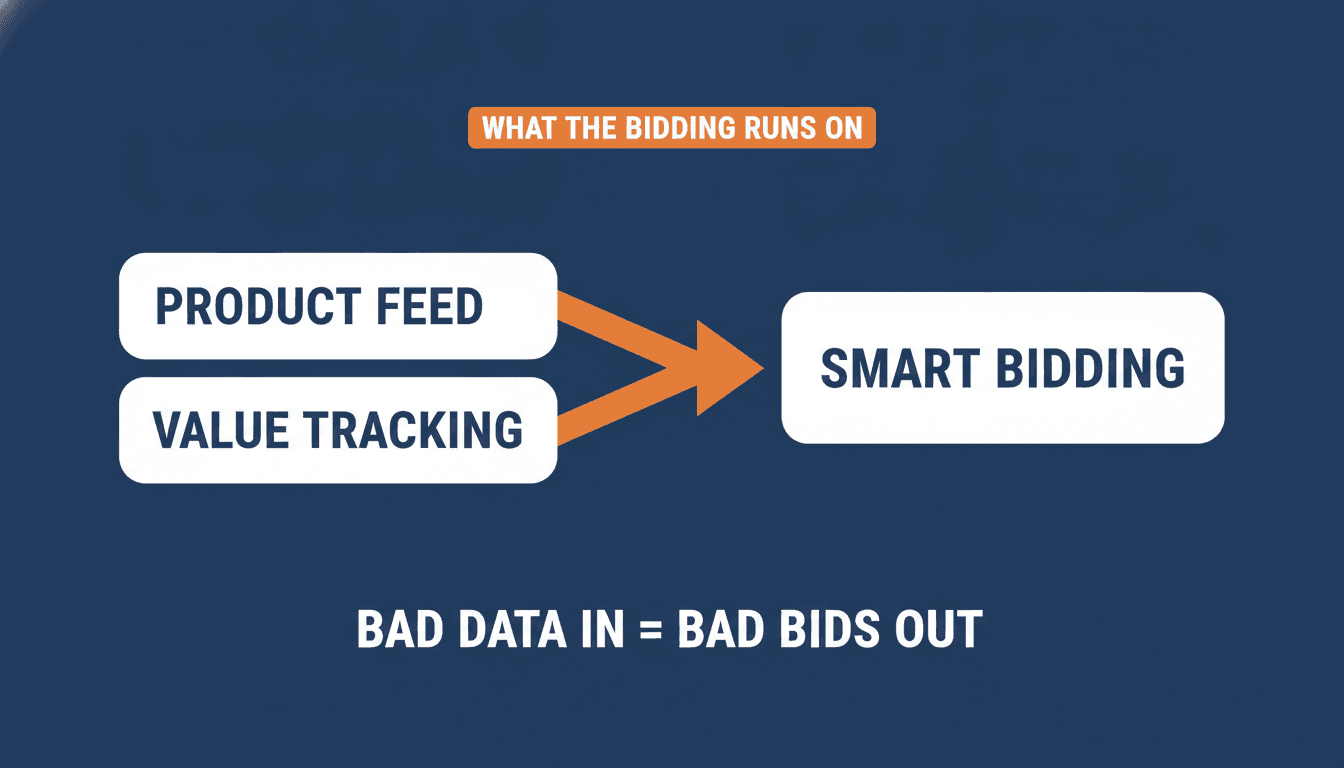
First the ruler, then the measurement. Tuning a bid strategy on polluted data is measuring with a broken ruler. Before you touch targets or bids, check two things: does your site send the real order value to Google, and is your feed clean (no disapprovals, correct prices, decent titles). This is the read from practice, not a knob Google points you to. But it is the order that makes the difference between steering and guessing.
The order nobody tells you straight
Most guides present Google Ads as a menu. Here are Search, Shopping, Performance Max, Display, Demand Gen, pick whatever fits. That sounds neutral and helpful, but it is misleading for an online store that is just starting or working with a limited budget. Because for 90 percent of online stores the order is not free.
This is the order I hold to, and it is deliberately a position, not a menu.
First: Shopping or Performance Max, on a clean feed. This is where the highest-intent traffic lands for the lowest effort. Someone searching for your kind of product sees your product with photo and price. No ad copy to write, no keyword lists to manage. The feed does the work, provided it is correct. That is why "on a clean feed" is there for a reason. With a messy feed you build your whole account on sand.
Then: Search, with your brand split from the rest. Separate your brand searches (people typing your store name) from your non-brand searches. If you do not, your cheap, certain brand traffic mixes with your expensive, uncertain cold traffic, and you can no longer see in your ROAS what works. Search is powerful, but it is more labour-intensive than Shopping, and you add it once the feed base stands, not before.
Only then, and for many stores never: the rest. Display, Demand Gen, remarketing layers. These are not starting points. An experienced ecommerce advertiser like Andrew Lolk says it publicly and plainly: he never runs Display campaigns in ecommerce accounts, because he has rarely seen them work well enough to include by default. You do not have to agree with him, but the point stands: half the campaign menu is, for the average online store, distraction rather than opportunity. Do not start with Display because a guide lists it. Start where the money is.
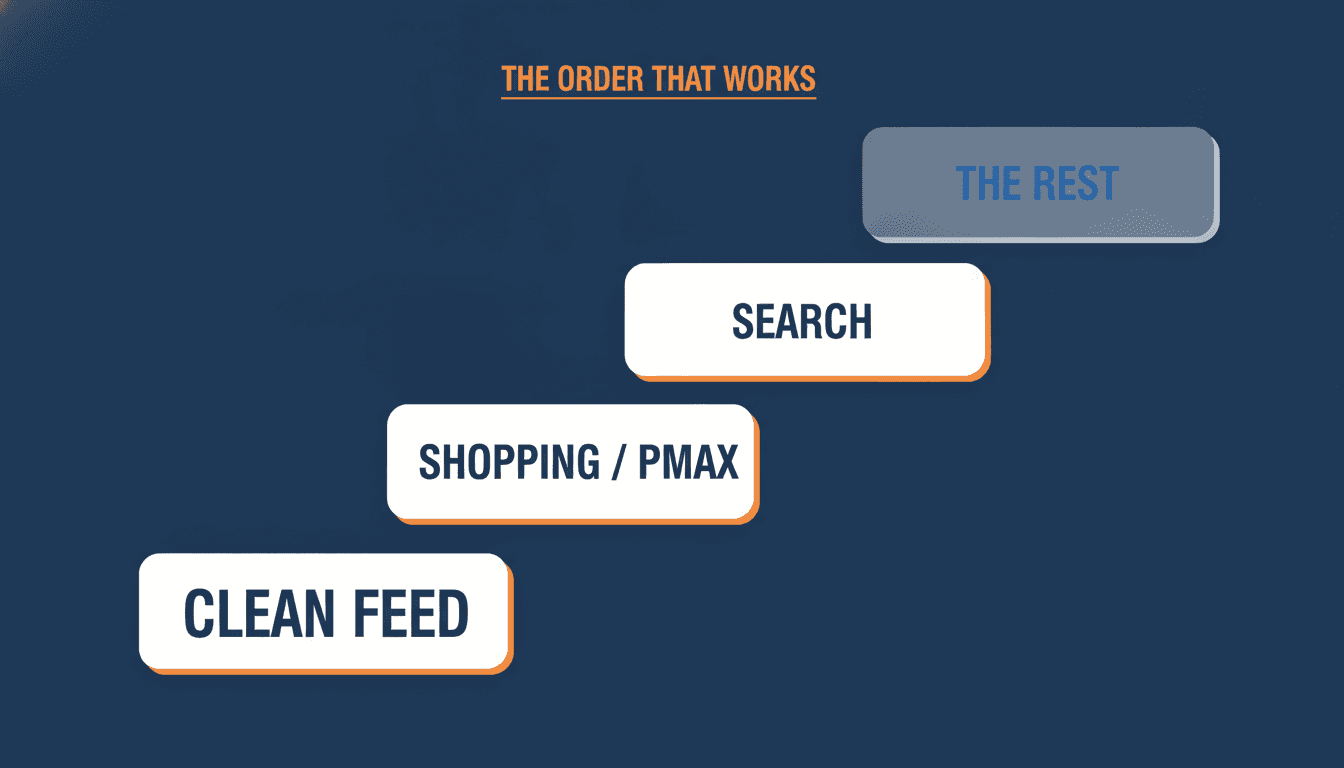
The practical order. Clean feed first. Then Shopping or Performance Max to catch the high-intent traffic. Then Search, with brand split from non-brand. The rest only once the base stands and proves it works, and for many stores that means not yet. One system in order at a time, not five campaign types switched on at once with a budget that gathers enough data on none of them.
That last line matters more than it looks. A common mistake is spreading a small budget across five campaign types. No single campaign then gathers enough conversions for Google's algorithm to learn, and everything stays stuck in the learning phase forever. Better to give one system enough budget to learn than to starve five.
And then the question that comes up on every forum: is my budget enough? "Is 500 euro a month enough", "is 20 euro a day enough". The honest answer is that the number matters less than what you put it on. Smart Bidding needs conversions to learn, and those conversions have to come from somewhere. A budget of 500 euro a month can work fine for one Shopping campaign on your ten best-performing products, and it can fail completely if you split it across Shopping, Search, Performance Max, and Display at once. The amount is not the problem, the fragmentation is. Concentrate a small budget on your best products in one system, and let it run long enough to clear the learning phase, instead of spreading it thin and wondering why nothing gets off the ground.
The campaign types, short and honest
Now that the foundation and the order stand, the campaign types themselves. Deliberately short, because the depth sits in the two layers above, not in listing every setting.
Shopping (Standard). Feed-driven, gives you the most control. Good for steering your top sellers tightly and adding negative keywords. For many stores the best starting point next to or instead of Performance Max, precisely because you see what is happening.
Performance Max. One campaign that serves every Google channel: YouTube, Display, Search, Discover, Gmail, and Maps, fed by your feed and your budget. Powerful and largely automated, but it is a black box. Give it good assets (your own product photos and video, not just what Google generates) and good audience signals (your own customer lists), or it steers on averages. Not your starting point if you still want to understand what works. For the full picture on how PMax actually uses your feed, campaign structure, and bidding, the Performance Max guide for ecommerce covers it end to end.
Search. Keyword-driven, for high-intent searches and your brand name. Indispensable, but more labour-intensive. Split brand from non-brand, and pick your match types deliberately, because for an online store your Search keywords and your feed fight over the same searches (more on that in keyword match types for an online store). Note: starting September 2026, campaigns using Dynamic Search Ads, automatically created assets, and the campaign-level broad match setting are automatically upgraded to AI Max, Google's new layer that expands your keywords with keywordless matching. Worth knowing before you build your Search structure now.
Demand Gen. Visual, across YouTube (including Shorts), Discover, Gmail, and Maps. Builds demand instead of capturing existing demand. Starting June 2026 the old video action campaigns migrate here. For most online stores a later layer, not a starting point.
Display. Cheap reach and remarketing. Sounds attractive, rarely earns enough in ecommerce to include by default. Skip until you have a concrete reason to run it.
Bidding without the mystery (and why it comes back to your feed)
Smart Bidding feels to many owners like magic or like a gamble. It is neither. It is a prediction, and you can feed it or pollute it.
Two strategies that matter for ecommerce. Maximize Conversion Value spends your whole budget and chases as much revenue as possible, regardless of efficiency. Target ROAS lays an efficiency ceiling over that: spend as long as the return stays above my goal. The difference is "spend it all, as smart as you can" versus "spend as long as it stays profitable".
The practical rule I hold to: start a new Shopping or Performance Max campaign on Maximize Conversion Value, with no target. The system has nothing to steer on yet. Let it gather roughly 30 to 50 conversions, and only then switch to Target ROAS, using your actually achieved return as the starting point. Giving a brand new campaign a high target is like asking someone to hit a sales quota on day one before they know the product. And set that target too high once it is running, and the campaign quietly stops spending altogether, which is its own trap I covered in why your Google Ads campaign stops spending.
And here everything comes together. Target ROAS runs on predicted conversion value. That prediction comes from your conversion value tracking and your feed. So the two things that make your bidding work are the same two things from the feed layer at the start of this piece. That is why bidding is not a separate field. It is the top link of a chain that begins at your product data.
One piece of first-party data that belongs here and that most stores leave on the table: enhanced conversions. It supplements your conversion measurement with hashed customer data (such as an email address, encrypted), and gives the algorithm a fuller picture to predict on. Google calls it a path to "more powerful bidding" itself. In the EU you handle the consent for this with Consent Mode. Not a side issue, but the foundation under a bid strategy that steers on numbers that hold up.
The summary in one glance
Google Ads for ecommerce does not work like a collection of loose knobs you optimize one by one. It is a chain, and it does not begin at your campaign but at your product data.
Three things to remember:
- The feed is your foundation, not a setting. Product data, feed, Merchant Center, auction, bidding: one chain. A fault at the front poisons everything behind it, and you do not see the cause at the place where it goes wrong.
- "Traffic but no sales" is rarely a targeting problem. It is usually a feed or value-tracking problem. First the ruler (clean feed, real order value), then the measurement (targets, bids).
- The order is not a menu. Clean feed first, then Shopping or Performance Max, then Search with brand split off, and the rest only once the base proves it works. Do not spread a small budget across five campaign types.
Do this today: open Merchant Center and look at one number before you change anything on your campaigns: how many of your products are disapproved or carry a warning? If you are running part of your budget on half a catalogue, that is your first win, before you touch a single bid. Want to know for certain whether your feed is the base your campaigns can honestly calculate on, request a Google Shopping review. That is where the return starts, not at the next target change.
Frequently asked questions
Is Google Shopping profitable for an online store?
Yes, but profitability is rarely decided by your campaign settings. Shopping runs on your product feed: your titles, prices, and attributes decide which searches you show up for and what value Google assigns to each click. A clean feed with strong product titles and accurate conversion value tracking is what makes a Shopping campaign profitable. Start there, not at the bid.
I get traffic but no sales. What is going wrong?
This is rarely a targeting problem, even though most advice points that way. For an online store the cause usually sits one layer deeper: product titles that match the wrong searches, or conversion value tracking that does not send the real order value. Smart Bidding then steers on polluted data and buys the wrong traffic. Check your feed and your value tracking before you touch bids or targets.
How much budget do I need for Google Ads for ecommerce?
The amount matters less than what you spend it on. Smart Bidding needs conversions to learn, and those have to come from somewhere. 500 euro a month can work fine for one Shopping campaign on your ten best-selling products, and fail completely if you split it across Shopping, Search, Performance Max, and Display at once. The problem is not the amount, it is the fragmentation. Concentrate a small budget on your best products in one system.
Should I start with Shopping or Performance Max?
For most online stores Standard Shopping is the better starting point, because you can see what is happening and steer your top sellers tightly. Performance Max is powerful but a black box: it serves every Google channel from one campaign, but gives you little insight into what works. Start with Shopping while you still want to understand where your return comes from, and only run either one after your feed is clean.
Do I need Display or Demand Gen campaigns for my webshop?
For most online stores, not as a starting point. Display rarely earns enough in ecommerce to include by default, and Demand Gen builds demand rather than capturing existing demand. The order that works: a clean feed first, then Shopping or Performance Max, then Search with brand split from non-brand, and only then the rest, once the base proves it works. Do not spread your budget across every campaign type at once.
About the author

Auke Jongbloed
Auke Jongbloed is a Google Shopping and product feed specialist. He builds a product feed manager for WooCommerce, and works directly with ecommerce store owners on Google Shopping and Performance Max setups via aukemarketing.com. Follow him on LinkedIn for more on Google Shopping and feed strategy.
Google Shopping account review
Find out exactly where your Shopping budget is leaking
I go through your campaigns, search terms, products, and feed settings and write up exactly where money is leaving -- ranked by recoverable spend, in plain language. From $297. No retainer, no commitment.
Get your account review