The Ultimate Google Shopping Guide: How It Works and How to Win in 2026
Shopping is the biggest line in most ecommerce Google Ads accounts. It accounts for the majority of what online stores spend on Google. And the part that decides whether all that spend works is the part most stores never touch: the product feed.
That is the gap this guide closes. Most Google Shopping guides explain the same three pieces, in the same order, and stop where the real work starts. This one treats the feed as what it actually is: the spine of the whole system, the thing every other decision sits on top of.
You do not need to read all of it. Find your situation and jump to it. If you are starting out, read top to bottom. If you already run Shopping and something is off, go straight to "What to fix first." If you are stuck on Standard Shopping versus Performance Max, that section stands on its own.
Key insights
- Google Shopping has no keywords. Your product feed is your keyword strategy, and the title is your match surface.
- The three pieces are a chain, not equal parts: store data, feed, Merchant Center, auction, bid. A weak link upstream caps everything downstream.
- Since October 2024, Performance Max no longer automatically beats Standard Shopping for the same products. Ad Rank decides, so both are real choices in 2026.
- Fix in order: feed, then structure, then bidding. Raising a bid on a broken feed just pays more to lose the same auctions.
What Google Shopping ads actually are
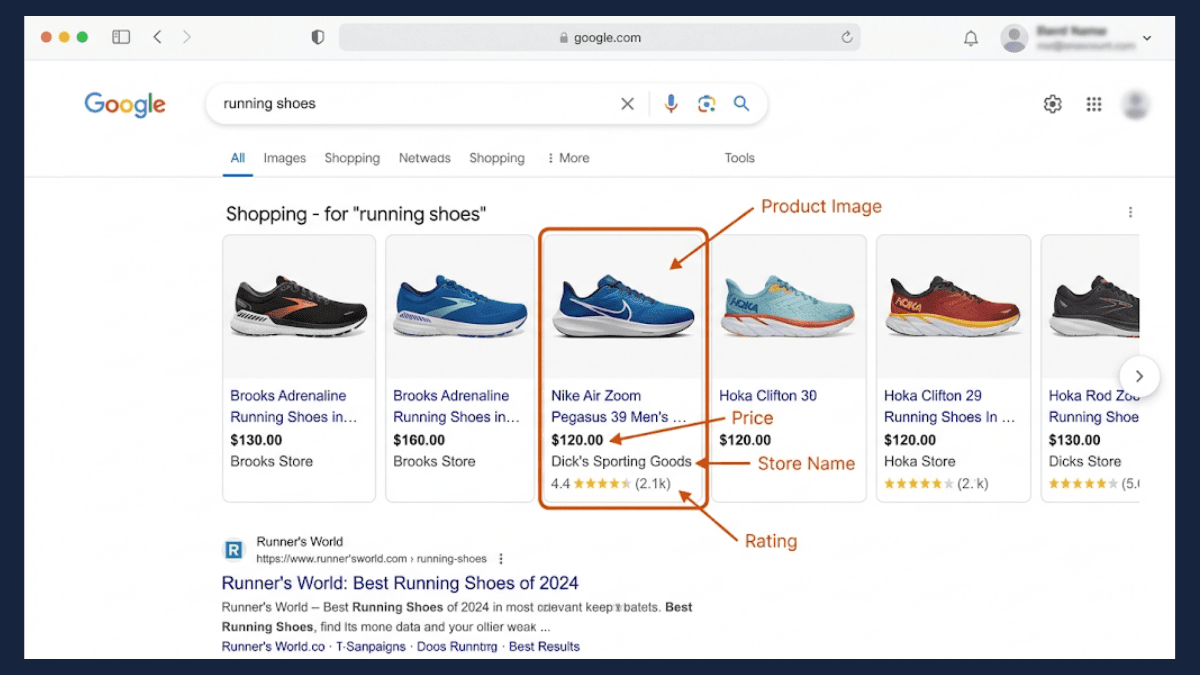
Google Shopping ads are visual product ads that appear when someone searches for something to buy. Instead of a line of blue text, the shopper sees the thing itself: a product image, the title, the price, your store name, and often a star rating. They run across Google Search, the Shopping tab, Google Images, and Google's partner sites. On a phone they frequently fill the top half of the screen, above the regular results, which is exactly where the attention is.
They are not a variation of Search ads. They work in a fundamentally different way, and the difference is the whole reason this guide spends so much time on your product data.
The first difference is that they are visual. A photo and a price do your qualifying for you. Someone who does not like the style, or cannot stretch to the price, scrolls past without clicking, so you are not paying for that click. Someone who likes what they see clicks already half-sold. The image is not decoration, it is the first filter.
The second difference is that they are product-specific. With a Search ad you can bid on the phrase "running shoes" and write one headline that covers your whole range. You cannot do that with Shopping. Each product competes as itself, with its own image, its own title, and its own price. There is no single ad that represents the category; there are as many ads as you have products.
The third difference is the one that changes how you work. With Search ads, you choose the keywords. With Shopping ads, you choose nothing of the sort. Google decides which searches your products are eligible for by reading your product feed, the file of titles, descriptions, prices and attributes you send it, and matching that data to what people type. You never build a keyword list. You never write ad copy in the usual sense. The feed does both jobs.
Hold on to that third point, because it reframes everything that follows. In Search, the lever you pull is the keyword. In Shopping, the lever is the data you feed Google about each product. That is not a setup detail you handle once and forget. It is the strategy itself, and it is why a store with mediocre products and an excellent feed routinely out-earns a store with great products and a sloppy one.
Why Shopping works for ecommerce
Shopping ads convert well because they catch people at the exact moment they have stopped browsing and started choosing. Someone who types "lightweight running shoes under 100" is not researching whether they want running shoes. They have decided. They are now comparing specific options and deciding where to buy. Putting your product, with its photo and price, in front of that person is about as warm as paid traffic gets. The intent is already there; you are just showing up for it.
That intent matters more than any clever campaign setting, because it sets a ceiling on everything downstream. A campaign aimed at high-intent searches can be mediocre and still make money. A campaign aimed at vague, early-stage searches can be perfectly optimized and still bleed budget, because the people seeing it were never close to buying. Shopping, by its nature, leans toward the buying end of that spectrum, which is why it carries so much ecommerce spend.
The visual format does a second job: it pre-qualifies the click before you pay for it. With a text Search ad, the shopper often clicks to find out what the product even looks like and what it costs, and a good share of those clicks bounce straight back. With a Shopping ad, the image and the price are right there. The people who do not like the look or the price never click, so you stop paying for the window-shoppers. The clicks you do pay for come from people who have already seen the product and the price and decided to look closer. Fewer wasted clicks, warmer traffic.
There is a cost advantage too, and it comes from how the bidding works. In Search, everyone selling shoes piles onto the same handful of high-value keywords, and that competition drives the cost per click up. In Shopping, you are not bidding on a keyword at all. You are competing product by product, on a far more specific match between what you sell and what was searched. That specificity tends to keep costs more reasonable than the equivalent Search campaign fighting for one crowded term.
It helps to know roughly where the numbers land, if only to tell whether your account is normal or an outlier. Across ecommerce, average Shopping click-through rates tend to sit somewhere around 0.7 to 2 percent, conversion rates around 1.5 to 3.5 percent, and cost per click typically between 0.50 and 1.50 dollars, with competitive categories like apparel running well above that. Treat those as industry weather, not a forecast for your store. Your real numbers depend on your category, your margins, your feed quality and your campaign structure, and the spread inside any single category is enormous. The value of the ranges is diagnostic: if your click-through rate is sitting at 0.3 percent or your cost per click is 8 dollars in a normal category, something upstream is broken, and the rest of this guide is about finding it. We will come back to those numbers with a worked example near the end, once the pieces are in place.
One honest caveat before we go on. "High intent" does not mean "instant profit." It means the opportunity is real if the chain behind the ad is sound. A high-intent search pointed at a product with a weak title, a poor image, or a price that is not competitive will still lose. Intent gets the shopper to look. The feed and the offer decide whether they buy. That is the bridge into how the whole system actually works.
How Google Shopping works: the three-piece system
Behind every Shopping ad sit three connected pieces. Most guides list them, and so will I, but the listing is where they stop and the real understanding begins.
Your product feed is a file, usually a spreadsheet or an XML document, that lists every product you want to advertise. Each row is a product, and each column is an attribute: the title, the description, a link to the product page, an image URL, the price, the availability, a unique product ID, and a long list of optional fields beyond that. This file is the raw material Google works from. It is not a copy of your store; it is a structured description of your catalog, written in the format Google reads. Everything Google knows about your products, it knows from this file.
Google Merchant Center is where that feed lives. It is a separate account from Google Ads, and that surprises people, but the separation makes sense once you see the division of labor. Merchant Center is about your products: it ingests the feed, checks every product against Google's rules, flags missing or invalid data, and shows you exactly how Google interprets each item. A product that fails those checks is disapproved, and a disapproved product cannot show anywhere, paid or free. Merchant Center is the gatekeeper. Nothing reaches a shopper without passing through it.
Your Google Ads campaign is the third piece, and it is about money and matching, not products. The campaign pulls your approved products out of Merchant Center, sets a budget and a bidding strategy, and enters those products into auctions. You decide which products to advertise and how much you are willing to pay. Google decides which searches to match them to, using the feed data. The campaign is the engine; the feed is the fuel; Merchant Center is the inspection it has to pass first.
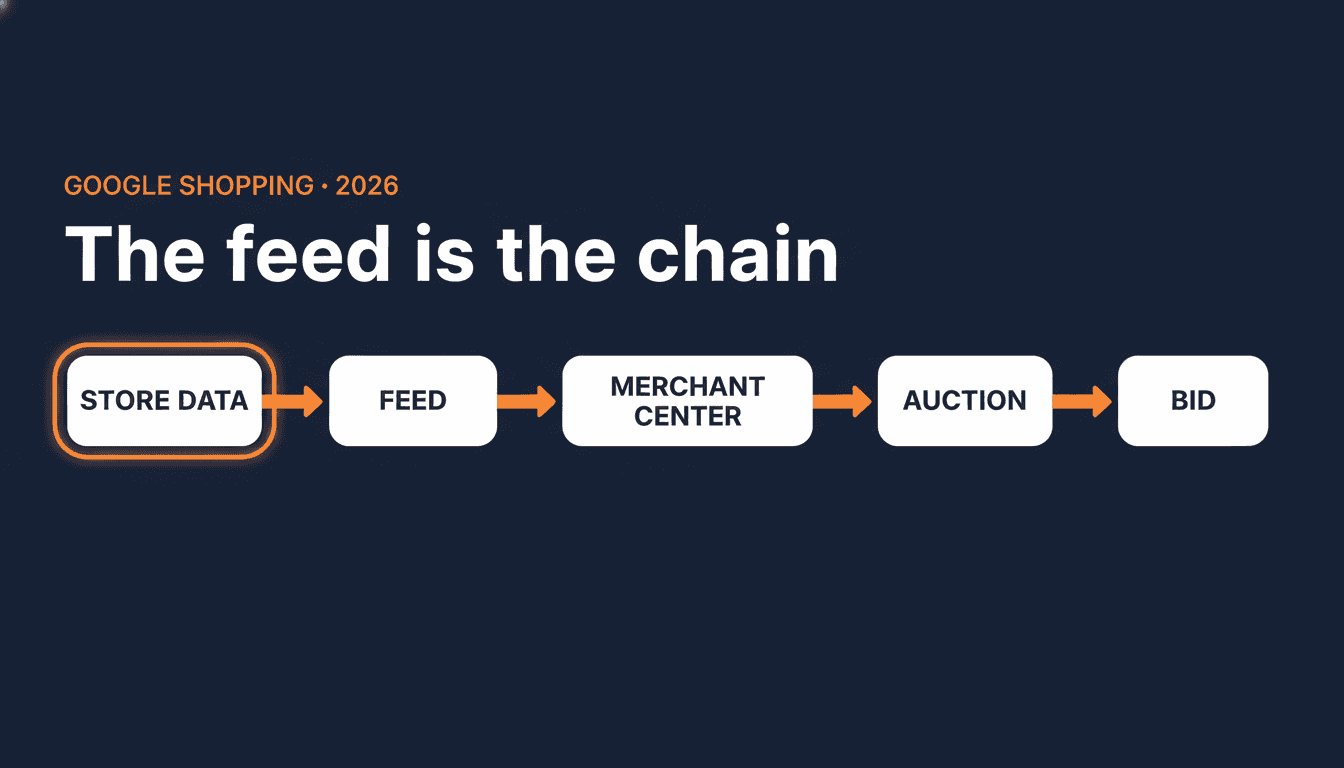
Now the part that most guides mention once and then walk away from, and the part this guide is built around. These three pieces are not three equal slices of a pie. They are a chain, and chains have a direction and a weakest link:
store product data → feed → Merchant Center → Shopping auction → bid
Read it left to right. Everything begins with the product data sitting in your store: the names, the categories, the images, the prices you actually have. The feed carries that data to Google. Merchant Center validates it. The auction matches it against what people search for. Your bid competes inside that auction. Each link depends on the one before it, and no link can be stronger than what reaches it.
That direction is the whole point, because it tells you where problems actually live. Imagine the data leaving your store is thin: a product called "Blue dress," no brand, no material, no size. By the time that reaches the auction, Google has very little to match against, so your product is eligible for far fewer searches than it should be. You can raise your bid all you like; you are bidding to win auctions you are barely entered into. The weak link was at the very start of the chain, but the symptom, low impressions and wasted spend, only shows up at the end. Most stores try to fix the symptom at the end. The fix is almost always further up.
The chain runs the other way too, though less often. A strong feed can still be throttled at the bottom link by a bid set so low it never clears the auction, or a budget so tight the campaign barely runs. The difference is that those are easy to spot and easy to undo. A relevance problem upstream is neither, which is why the feed earns the attention first.
There is one more thing the chain explains, and it is a genuine bonus. The same Merchant Center feed that powers your paid ads also powers free product listings. By opting in to what Google calls surfaces across Google, your products can appear organically, with no bid attached, across Search, the Shopping tab, Images and more. It is the identical chain, simply without the final bidding link. This is why getting the feed right pays you twice: one clean feed earns both your paid eligibility and your free visibility. We will come back to free listings properly near the end, but it is worth seeing now why they are not a separate project. They fall out of the same work.
The rest of this guide follows the chain. We start at the link that decides the most and is fixed the least: the feed.
The feed is your keyword strategy
Here is the practical consequence of "no keywords." Whatever you put in your product data, and above all in your title, is what decides which searches you are eligible to show for. The title is your match surface. There is no keyword tool that rescues a weak title, and no bid that compensates for one. In Search you pick the words you want to be found for. In Shopping you write them into your feed, mostly into the title, and Google reads them back out. That is the entire mechanism, and once it clicks, feed work stops feeling like admin and starts feeling like what it is: the highest-leverage hour in the whole account.
So the title deserves real care, and it is also where the most common and most expensive mistake hides.
The title: front-load, do not stuff
Plenty of guides tell you to "use all 150 characters." That is incomplete advice, and following it literally makes weaker titles. Here is the accurate version. The title attribute accepts up to 150 characters, but shoppers usually see only the first 70 or so, depending on their screen and where the ad shows. Google's own guidance is to put the most important details first. So the rule that actually works is not "fill 150 characters," it is front-load the first 70 with what defines the product and what a buyer would actually search, then use the remaining space for the supporting attributes that help Google match.
Think about what "defines the product" means for your catalog. For most physical goods it is some combination of brand, product type, and the key distinguishing attributes: material, color, size, model, gender, capacity, whatever a buyer would say out loud. Lead with those.
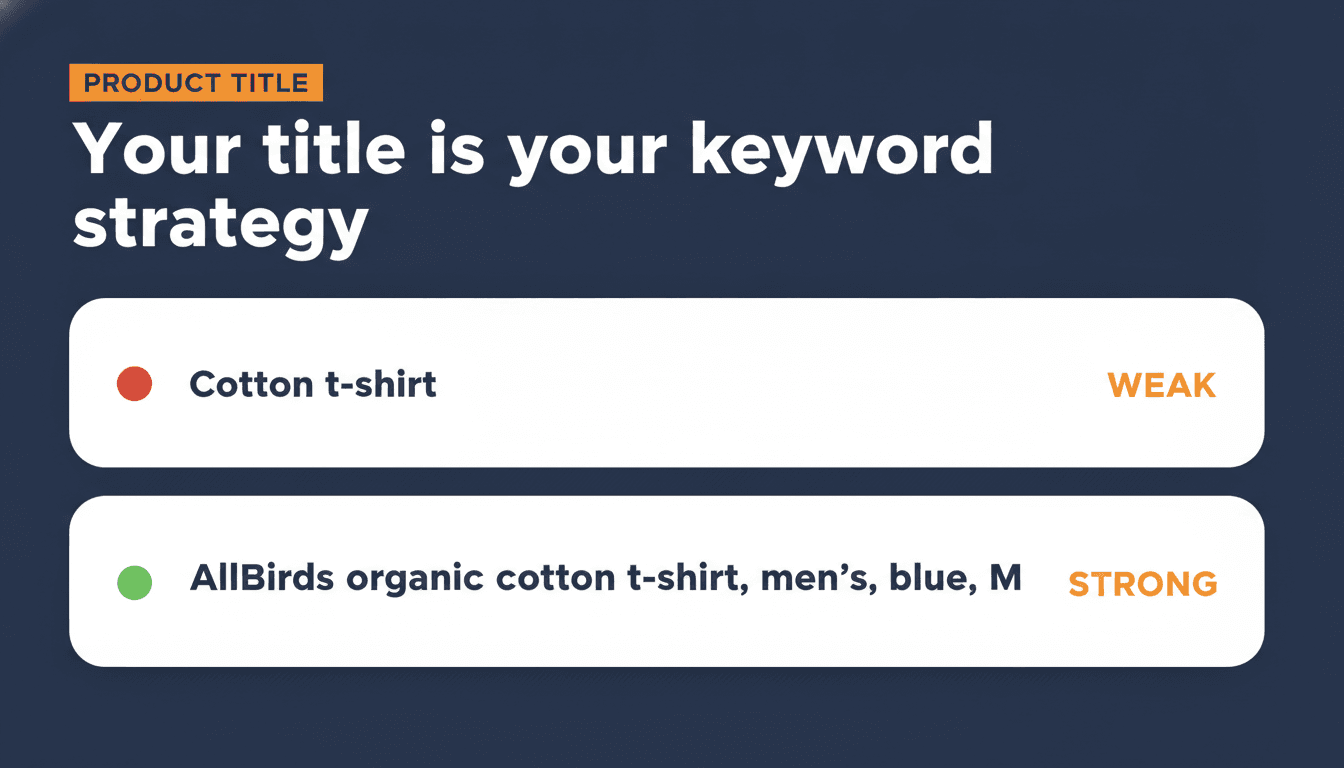
A worked contrast makes it concrete:
- Weak:
Cotton t-shirt - Better:
Organic cotton t-shirt, men's, blue - Strong:
AllBirds organic cotton t-shirt, men's, blue, size M
The weak version is technically accurate and almost useless. It gives Google a single broad category to work with, so it competes for "cotton t-shirt" and little else, against thousands of others. The strong version leads with brand, material, fit, color and size, the exact words people add when they are close to buying ("men's blue organic cotton t-shirt"), and it does it inside the first 70 characters where the shopper will read it. Same product. Completely different eligibility, and a completely different click-through rate, because the title now matches the more specific, higher-intent searches that convert.
A few title rules worth following, all from Google's own product data guidance:
- Most important detail first. If only the first 70 characters are read, the brand and product type cannot be at the end.
- No promotional text or gimmicks. "Free shipping," "best price," all-caps, exclamation marks and symbols do not belong in a title and can get a product disapproved.
- Match the title to the landing page. The title has to describe the product the link actually goes to. A mismatch is both a disapproval risk and a conversion killer.
- Give each variant its own distinguishing details. If you sell the same shirt in five colors, each variant's title carries its color and size, so each can match its own searches.
Images: the silent qualifier
After the title, the image is the attribute that moves the most, and it is doing two jobs at once. It affects whether your product is even shown, because Google judges image quality, and it does the visual qualifying we talked about earlier, deciding whether the shopper clicks. The brief is simple and strict: a clean, well-lit photo of the actual product, ideally on a plain background, no watermarks, no promotional text burned into the image, no placeholder. A blurry image, a tiny image, or a lifestyle shot where the product is hard to make out will quietly cost you impressions and clicks, and you will never see a line item that says so. It just underperforms.
Identifiers: connecting to Google's catalog
The third feed lever that carries real weight is the set of product identifiers: the GTIN (the global trade item number, the number behind a barcode), the brand, and where relevant the MPN (manufacturer part number). These connect your product to Google's existing catalog of known products. When Google can confidently match your listing to a product it already understands, it knows far more about what you are selling and can match it to the right searches with more confidence. For branded, manufactured goods, supplying a correct GTIN is one of the cheapest wins available, and missing or wrong identifiers are a frequent cause of weaker performance and, sometimes, outright disapproval.
Why this is the link that matters most
Step back and notice why all of this sits at the top of the chain. The title decides which searches you can appear for. The image decides whether you appear and whether the shopper clicks. The identifiers decide how well Google understands you. Every layer below this, campaign structure, bidding, budget, can only work with the eligibility and the relevance these attributes create. You cannot bid your way to a search you are not eligible for. You cannot structure your way around an image that suppresses impressions. The feed sets the ceiling; everything else operates under it.
That is the case for doing the unglamorous work first. It is also why, when an account is underperforming, the feed is the first place to look and not the last. We will get to the full "what to fix first" order shortly. For the deepest version of the title question specifically, including what happens when Google rewrites your titles anyway, there is a dedicated guide to Google Shopping product title optimization that picks up where this section leaves off.
Setting up Google Shopping: the real steps
You do not need a click-by-click tutorial to get going, and a click-by-click tutorial would be out of date within months anyway, because Google keeps moving the buttons. What does not change is the shape of the setup, and the shape follows the chain. Four moves, in order.
1. Get your product data right at the source
Start in your own store, not in any Google tool. Every product you intend to advertise needs a clear, front-loaded title, a clean image, an accurate price, a correct availability status, and, for branded goods, a GTIN or manufacturer identifier. This is the same data we just covered, and the reason to fix it here, at the source, is that everything downstream is a copy of it. If you patch a title inside a feed tool but leave the store untouched, you now maintain two versions of the truth and they will drift apart. Fix it once, where the product actually lives, and the whole chain inherits the fix.
This step is the one most people rush, and it is the one that determines whether the next three weeks go smoothly or turn into a disapproval cleanup.
2. Create Merchant Center and get your products into it
Next, create a Google Merchant Center account and get your product data into it. There are a few ways to do this. The most reliable is a connected, automatically updating feed: you link your store platform to Merchant Center so that prices, stock levels and new products sync on their own. You can also upload a structured file on a schedule. Merchant Center Next will additionally pull in product data by crawling your website on its own, which is a helpful fallback, but for a serious ecommerce catalog you want a structured feed or a direct platform integration as your primary source, not the crawl. A structured source gives you control over exactly what each attribute says; the crawl gives you whatever Google can scrape.
Wherever you can, choose the automatic connection over a manual upload. The reason is not convenience, it is accuracy. Prices and stock change constantly, and a feed that goes stale is a feed that gets products disapproved: Merchant Center notices when the price on your page does not match the price in your feed, and it will suspend the offending products. An auto-updating source keeps the data honest without you babysitting it. If your store connects through a developer-built integration rather than one of the built-in options, it is worth confirming which API it talks to. Google is shutting down the older Content API for Shopping on August 18, 2026, and the check takes five minutes.
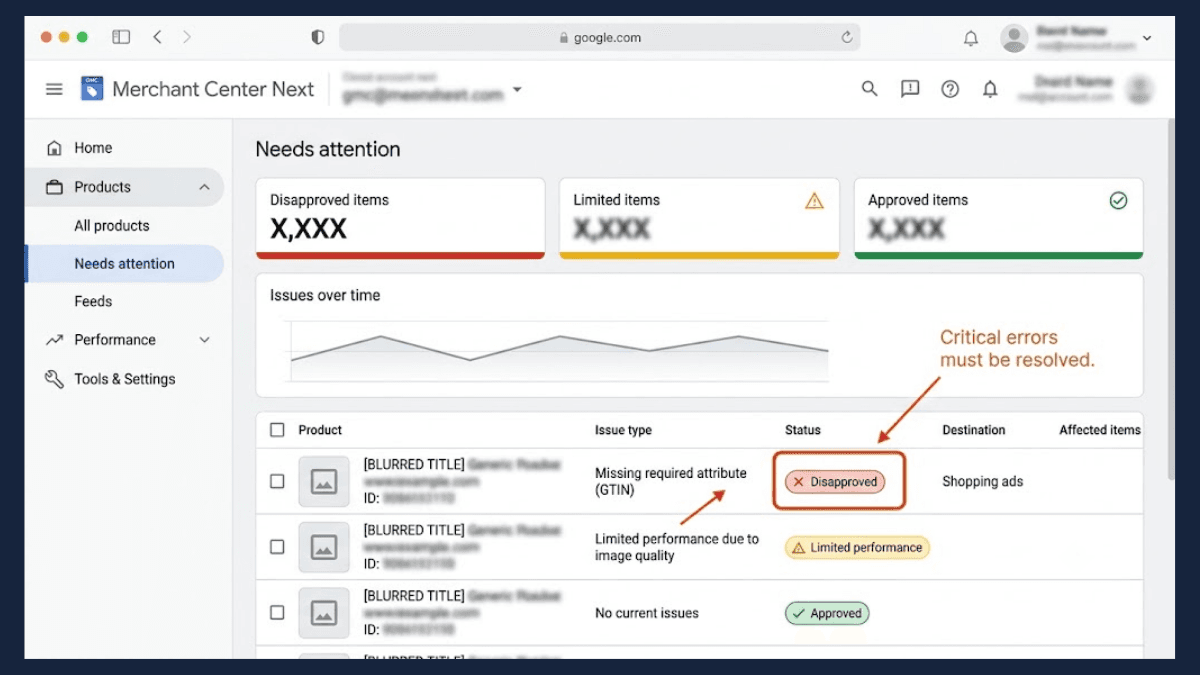
Once the feed is in, Merchant Center runs its checks and tells you which products are approved and which have problems. Do not skip past this to get to the exciting part. Clearing those problems is the exciting part; it is the difference between a campaign that can actually serve and one that quietly cannot. In Merchant Center Next this lives under the "Needs attention" tab inside the "Products" page rather than a standalone diagnostics screen, and we will go through the common errors in the next section.
3. Link Merchant Center to Google Ads
The third move connects the two accounts. Merchant Center holds your products; Google Ads holds your budget and runs the auctions; linking them is what lets a campaign pull your approved products in. It is a quick, one-time connection, and it is easy to forget that the two are separate systems until a link breaks and a campaign suddenly has nothing to show. If products stop serving for no obvious reason, the account link is worth checking early.
4. Create the campaign and choose your type
Only now do you build the actual Shopping campaign in Google Ads: set a daily budget, choose a bidding strategy, and decide which products to advertise. This is also the moment you choose between Standard Shopping and Performance Max, which is a real decision with real consequences, and it gets its own section next.
A note on budget at this stage, because it is the most common early mistake after a weak feed. Set a budget you can sustain through a learning period, not a number designed to limit your risk to almost nothing. A campaign starved of budget never gathers enough auction data to optimize, so it stays mediocre and confirms the fear that put it on a tiny budget in the first place. We will put real numbers on this in the "what to expect" section.
A word on the interface itself
One practical warning that will save you confusion. Google moved every account to the newer Merchant Center Next interface, finishing the rollout in late 2024, and there is no way back to the classic version. So if you are following an older tutorial or a screenshot-heavy blog post, the menu names and the location of some settings will not match what is on your screen. A few renames trip people up most: "Destinations" is now "Marketing Methods", "Feeds" are now "Data Sources", and the old "Diagnostics" page now lives as the "Needs attention" tab inside "Products". The underlying structure is unchanged, data in, checks, approvals, products served, but the labels differ. When a guide's click path does not line up, look for the equivalent setting rather than assuming the feature was removed.
Merchant Center: approvals, errors and disapprovals
This is the section most guides skip, and it is the one that quietly decides whether your campaign can run at all. A disapproved product does not show. Not in a paid ad, not in a free listing, nowhere. You can have a perfect campaign pointed at a product that is invisible, and the only sign will be impressions that never arrive. So before any optimization, you make peace with the "Needs attention" tab.
Approved, pending, disapproved: what the statuses mean
When your data lands in Merchant Center, each product gets a status. Approved means it can serve. Pending means Google is still reviewing it, normal for new products and usually short-lived. Disapproved means something is wrong and the product is blocked until you fix it. There is also a softer state worth watching: a product can be approved but limited, meaning it serves, but in fewer places than it could, usually because of missing data like identifiers. Limited is not an error, it is money left on the table.
The mental model: approved is the floor, not the goal. Plenty of accounts are "mostly approved" and still leaving a third of their potential in the limited and disapproved buckets.
The disapprovals you will actually meet
Most disapprovals come from a short list of recurring causes. Knowing them by sight saves days.
Price mismatch. The price in your feed does not match the price on your landing page. This is the single most common feed disapproval, and it is almost always a sync problem: a sale ended, a currency is wrong, or the feed updates on a slower schedule than the store. The fix is an auto-updating data source, which is exactly why Step 2 pushed you toward one.
Missing or invalid GTIN. For branded, manufactured products, Google expects a valid GTIN. A wrong number, a made-up one, or a missing one on a product that should have it triggers disapproval or limits reach. The fix is to supply the correct manufacturer identifier, not to invent a placeholder. The exception is genuinely one-of-a-kind goods, handmade pieces, vintage items, or your own custom products with no manufacturer code, where the correct move is to declare that no identifier exists rather than fake one. That tells Google the omission is deliberate, not an error.
Image problems. Promotional text or logos burned into the image, a placeholder "image coming soon," or an image Google cannot fetch. Shopping wants a clean product shot, and it enforces that. The fix is a compliant image and a working image URL.
Mismatched or missing required attributes. A required field is empty, or the title and description describe a different product than the landing page shows. The fix is to align the feed with the page and fill the required fields.
Policy disapprovals. The product, or how it is described, runs into a Google Shopping policy: restricted categories, prohibited claims, or promotional gimmicks in the title. These need a real edit to the product or its data, not a resubmission.
Website or account-level issues. Sometimes the problem is not one product but the whole account: an unverified website, a missing or inadequate returns and refund policy, or contact information Google cannot confirm. These suspend everything, so they are worth ruling out first when nothing is serving. If the reason is misrepresentation, this guide explains how to fix the cause before you request a review.
How to work the list without drowning
A catalog of thousands can show hundreds of issues, and the instinct is to fix them top to bottom. Do not. Work by impact, which is exactly how Merchant Center Next now tries to sort them for you.
Start with anything account-level, because one website-verification or policy suspension can be the reason an entire catalog is dark. Fix that and a huge number of "product" problems often clear at once. Then handle the issues that block your best-selling or highest-margin products, because a disapproval on your hero product costs more than a disapproval on a long-tail item you rarely sell. Then work down to the limited-performance warnings, which suppress rather than block. Triage by money, not by row order.
One discipline that pays off: after you push a fix, give Merchant Center time to re-review before you conclude it did not work. Re-crawls and re-reviews are not instant. Fixing the same product three times in an hour because the status has not updated yet is a common way to waste an afternoon.
Why this sits where it does in the chain
Merchant Center is the validation link in the chain, the inspection every product must pass before it reaches an auction. That is why feed work and error-clearing come before any campaign tuning. There is no point optimizing bids for a product that cannot serve, and no point scaling budget into a catalog that is one third invisible. Clearing approvals is not preparation for the real work. On a feed-first account, it is a large part of the real work, and it is the cheapest performance you will ever buy back, because the demand was already there and a data problem was hiding your products from it.
For the deeper, error-by-error version of this, with the exact wording Merchant Center uses and how to resolve each, use the Merchant Center Error Decoder, which has a dedicated page per error. For the campaign side of the same work, this connects directly to the dedicated guide on optimizing Shopping campaigns, where the feed-and-diagnostics layer is the first thing it tackles.
Standard Shopping vs Performance Max in 2026
Two campaign types can run Shopping ads, and which one you choose changes how much control you keep, how much you can see, and where your products appear. This is the decision store owners get most stuck on, partly because a lot of the advice online is now out of date. So it is worth slowing down and getting it right.
What each one is
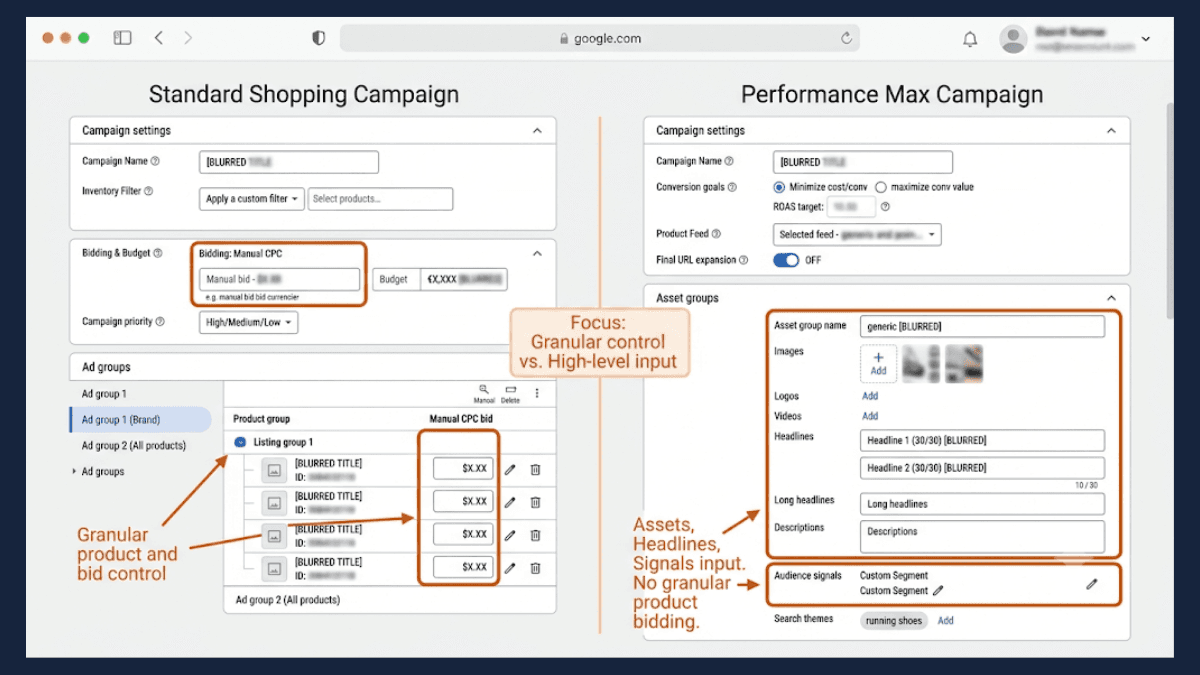
Standard Shopping is the transparent, hands-on option. It runs on the Search Network, you set bids at the product level, and you can see far more of the search terms triggering your ads than you can in Performance Max, along with product-level data. Google has tightened search-term reporting across all campaign types for privacy reasons, so "full" visibility no longer exists anywhere, but Standard Shopping still gives you the richest view of buyer intent and the most direct control. The payoff is not just control, it is learning: you find out which products are profitable, which searches convert, and what your true cost per acquisition is. That knowledge stays with you and informs every later decision.
Performance Max is the automated, wide-reach option. From a single campaign, Google runs your products across all of its surfaces, Search, Shopping, Display, YouTube, Gmail, Discover and Maps, and it handles the bidding, placement and targeting itself. You provide a budget, a goal, and your product feed plus some creative assets, and Google optimizes toward the goal. In exchange for that reach and automation, you give up control: you cannot set bids by product. It is worth saying that Performance Max is no longer the sealed box it was in 2022. Through 2025 Google added campaign-level negative keywords, expanded search themes, channel-level reporting that shows which surfaces drive results, and search-term insights. The gap has narrowed. But it is still meaningfully less transparent and less controllable than Standard Shopping, and you are still trusting Google's automation with most of the decisions.
Here is what that difference looks like in the actual setup screens, granular product and bid control on the left, high-level assets and signals on the right:
Here is the side-by-side:
| Standard Shopping | Performance Max | |
|---|---|---|
| Placements | Search Network (with Search Partners) | Search, Shopping, Display, YouTube, Gmail, Discover, Maps |
| Reach | Limited | Very wide |
| Bidding | Target ROAS, Maximize Clicks, Manual CPC | Maximize Conversions or Conversion Value, with optional targets |
| Control | Very high, product-level | Lower, though more controls added since 2025 |
| Transparency | Higher, richer search-term and product data | Lower, improving since 2025 but still limited |
| Dynamic remarketing | Not by itself | Yes |
| Best when | You want to learn and control | You want reach and automation at scale |
The 2026 correction that changes the decision
For years the working assumption was simple and is now wrong: if you ran Performance Max and Standard Shopping together, Performance Max would automatically win the same products. Many guides still describe the world that way. It changed in October 2024. Google stated:
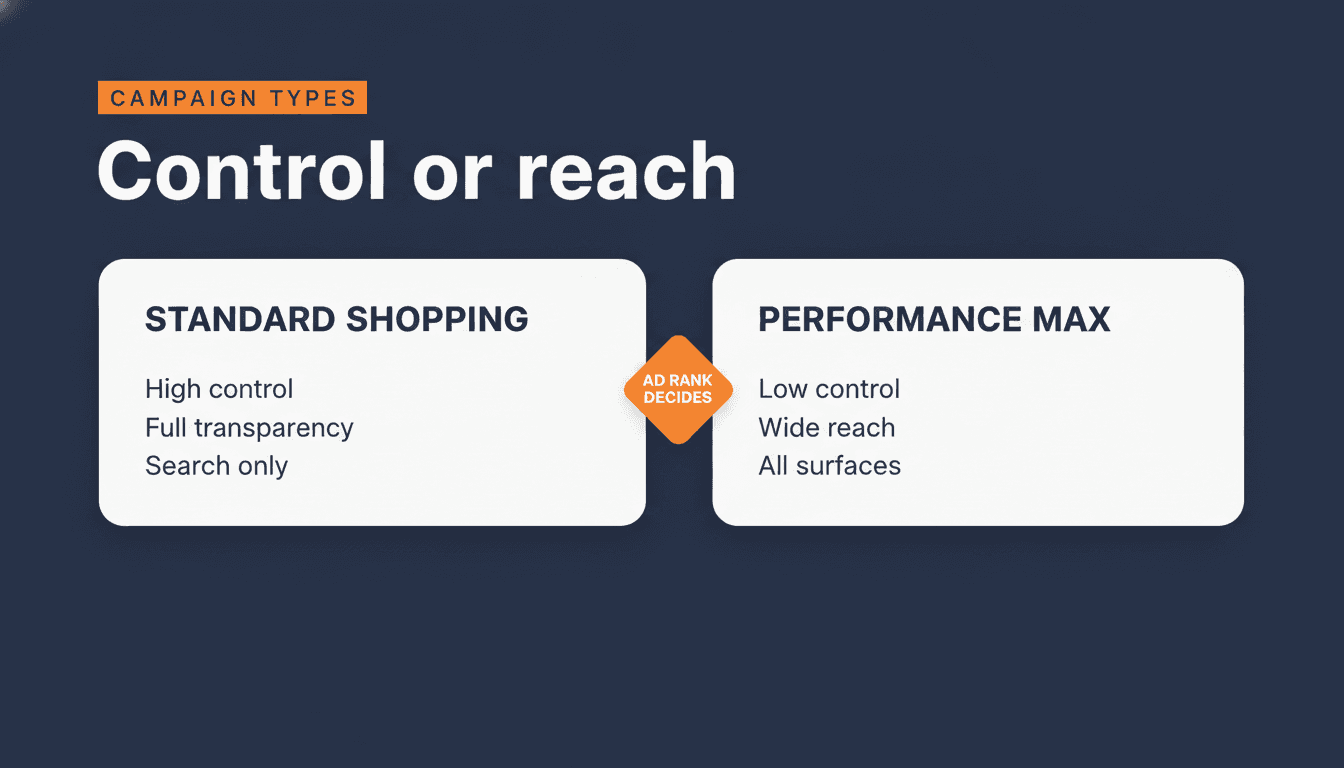
"Now, if you are running Performance Max and Standard Shopping campaigns together, Performance Max will no longer be automatically prioritised when the campaigns are in the same account targeting the same products. Instead, Ad Rank will determine which campaign serves an ad."
Read what that actually means, because it matters for how you plan. Performance Max no longer gets a built-in head start over your own Standard Shopping campaigns. When the same product is eligible to serve in both, the campaign with the higher Ad Rank wins the auction, the same way two advertisers compete. Since that change, plenty of accounts have found Standard Shopping holding its own, or beating Performance Max on the products where it has tight feed and bid control, precisely because it is no longer pushed to the back of the queue. Any source still telling you "PMax always wins, so just run PMax" is describing a system that ended in late 2024.
This is the single most important update in this whole guide for anyone who set up their account before 2025, because it reopens a choice that used to be made for you.
So which should you run?
In 2026 this is a real decision, not a default. The honest answer depends on where you are.
If you are starting out, begin with Standard Shopping. Not because it is "better," but because it teaches you the things you need to know before automation can help you: which products earn money, which searches convert, what a customer actually costs you. Performance Max is more of a black box. Even with the reporting and controls Google added from 2025 on, it is still far less transparent than Standard Shopping. If you start there, and it works, you will not know why, and if it does not work, you will not know why either, only that the number is bad. You will be tuning a machine you can only partly see inside. Run Standard Shopping until you have a steady flow of conversions and a clear picture of your economics. Then you are equipped to judge Performance Max on evidence instead of hope.
If you already have data and conversions, the answer is often both. Run Standard Shopping for your core, high-control products, where you want to see search terms and set bids deliberately, and use Performance Max for reach: expansion, the surfaces Standard Shopping cannot touch, and remarketing. Many strong accounts run them side by side, and now that Ad Rank decides between them rather than an automatic rule, that combination is more controllable than it used to be.
Whichever you choose, the feed decides the outcome. This is the part the "Standard vs PMax" debate usually forgets. Performance Max is even more dependent on feed quality than Standard Shopping, because the feed and your assets are almost the only levers you have left; you cannot rescue a weak Performance Max campaign with manual bids, because there are none. And Standard Shopping's control is only worth having if the feed underneath it is giving Google something good to match. The campaign type is a choice about how much you automate. It is not a substitute for the chain. A clean feed makes either option work; a broken feed makes both fail, it just hides the failure better in Performance Max.
If you have decided Performance Max is next, the Ultimate Performance Max Guide picks up exactly here: the feed gate to run before you touch a single campaign setting, when PMax is (and isn't) the right choice, and what changed in 2025 and 2026 that most guides still get loose.
Campaign structure: stop averaging your whole catalog
The default Shopping setup is one campaign, one ad group, every product in a single bucket. It is a fine place to begin and a poor place to stay, because it forces one budget and one bidding logic across products and searches that have nothing in common. A 15 dollar accessory and a 300 dollar flagship sit in the same bucket. A high-intent search from someone ready to buy and a vague top-of-category browse are treated the same. Structure is how you stop averaging, so you can spend more where it pays and less where it does not.
You do not need structure on day one. You need it once you have enough traffic and conversion data to see patterns, because structure without data is just guessing with extra steps. When the data arrives, two splits do most of the work.
Split by intent
Not every search for your product is equally close to a purchase. "Running shoes" is broad and early. "AllBirds men's blue running shoes size 10" is specific and nearly decided. In a single flat campaign, both pull from the same budget at the same bid, which means your broad, cheap-to-trigger, low-converting searches can quietly eat the budget your high-intent searches needed.
In Standard Shopping, the classic way to separate them is the campaign priority setting combined with negative keywords. You run more than one campaign over the same products, set their priorities high, medium and low, and use negative keywords to push the high-intent queries down into the campaign you have funded and bid for them. High priority does not mean "most important," it means "Google looks here first," so a high-priority campaign with the broad terms negatived out becomes your funnel. It is a few moving parts, but the principle is simple: route the searches you value most into the campaign you have set up to win them.
Split by margin and product role
Your catalog does not make money evenly. Some products carry a healthy margin, some are thin, some are loss leaders you sell to win the customer. Bidding the same on all of them is leaving money on the table at both ends: underbidding your earners and overbidding your duds.
The tool for this is the custom label. A custom label is simply a field in your feed that you fill with your own categories, high-margin, clearance, seasonal, best-seller, whatever division matters to your business, and then use to group and bid inside your campaigns. Tag your products by the dimension that drives your decisions, and you can bid up the high-margin best-sellers and pull back on the thin-margin long tail. Custom labels are where your business knowledge, the things only you know about your own products, finally enters a system that otherwise only sees titles and prices.
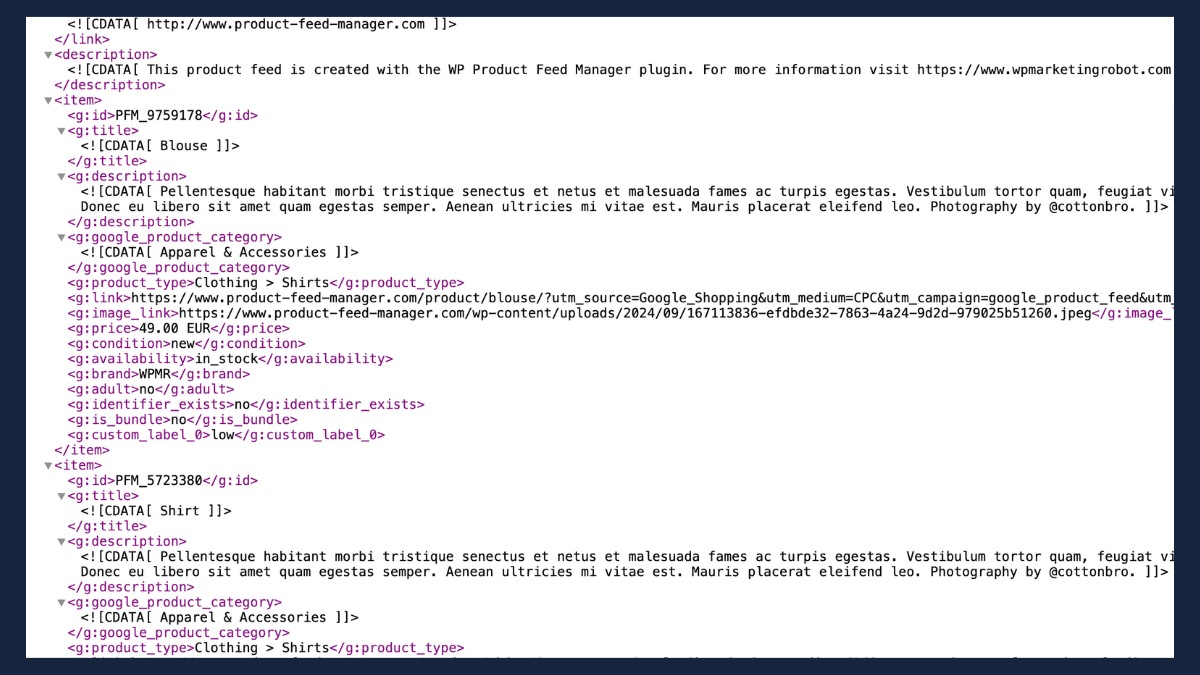
A practical sequence that works for most stores: start by tagging margin tiers (high, medium, low), because margin is usually the dimension that changes bids the most. Add a "best-seller" label once you know what your best sellers are. Add seasonal labels only when you genuinely run seasonal pushes. Resist the urge to build ten labels on day one; you will not use most of them, and each one is feed maintenance forever.
Structure follows the feed, not the other way around
One caution, because it is the trap. Structure is satisfying to build. It feels like real optimization, splitting campaigns, setting priorities, tagging labels, watching the account get sophisticated. And it is worth doing. But it sits below the feed in the chain, which means a clever structure on top of a weak feed is polishing the wrong layer. If your titles are thin and your products are barely eligible, segmenting them into three campaigns just gives you three campaigns full of barely-eligible products. Get the feed right first, prove you have demand and conversions, then build the structure that lets you spend into that demand intelligently. Structure multiplies a good feed. It cannot replace one.
Bidding: from manual control to automated targets
Bidding is the last link in the chain, and it is the one people reach for first, which is exactly backwards. By the time bidding matters, the feed has decided what you are eligible for and the structure has decided how you are grouped. Bidding only sets how hard you compete inside the auctions you have already qualified for. It is powerful, but it cannot manufacture relevance that is not there. Get the order right and bidding becomes the lever that scales a working account. Get it wrong and it becomes the knob people twist while the real problem sits untouched upstream.
There are two broad worlds: manual bidding, where you set the price, and automated (Smart) bidding, where Google sets the price to hit a goal you give it. The right path moves from one to the other as your data grows.
Start with Manual CPC
When a campaign is new and has little conversion history, start with Manual CPC. You set the maximum cost per click yourself. It is more work and it will not be perfectly optimized, and that is the point: it forces you to think about what a click on each product is actually worth, and it gives you a clean baseline of performance data without an algorithm making moves you cannot see. Manual CPC during the early period is how you learn your own numbers before you hand the wheel to automation.
This also protects you from a common early mistake: switching to automated bidding before there is enough data for it to work, then blaming the strategy when it underperforms. Automation needs conversions to learn from. Early on, you do not have them, so you stay manual and gather them.
Move to Smart Bidding when you have the data
Once a campaign has a steady flow of conversions, automated bidding has something to optimize on, and it will usually beat manual management because it adjusts every auction in real time using signals you cannot act on by hand. The two strategies that matter for Shopping are:
Target ROAS tells Google the return you want for every unit of ad spend, and it bids to hit that ratio. This is the workhorse for most ecommerce accounts, because it ties bidding directly to revenue.
Maximize Conversion Value, optionally with a Target ROAS, tells Google to get the most total revenue from your budget. It is useful when you want to spend a fixed budget as productively as possible rather than hold a strict return ratio.
(Maximize Clicks exists too, but it optimizes for traffic, not sales, so it is mostly a tool for an early data-gathering phase, not a destination.)
The thresholds and the discipline that make Smart Bidding work
This is where most automated-bidding disappointment comes from, so it is worth being precise.
Wait for enough conversions. Google's documented minimum for Target ROAS is on the order of 15 conversions in the past 30 days, but a documented minimum and a reliable one are not the same thing. As a working rule, aim for at least 15 to 30 conversions to switch at all, and ideally 50 or more in the last 30 days before you lean on it hard. Below that, the algorithm is optimizing on too little data and the results swing wildly. Treat these as guidance, not a system gate: the campaign will let you switch earlier, it just will not perform as steadily.
Set the target at your history, not your hope. When you switch to Target ROAS, set the target at the return you are actually achieving now, not the return you wish you had. If you currently run at a 4x return and you set a target of 8x, you have not doubled your profit, you have told Google to stop bidding on most of your auctions, and your volume collapses. Start at your real average so the algorithm has room to keep serving.
Move it in small steps. Once it is stable, tighten the target gradually, in the order of 10 percent every couple of weeks, and watch what happens to volume each time. Big jumps in the target cause big drops in spend and sales, because you are repricing the entire account at once. Small steps let you find the point where return and volume balance, instead of overshooting it.
Do not touch it constantly. Smart Bidding has a learning period after every significant change. Editing the target every few days keeps the campaign permanently re-learning and never settling. Make a change, then leave it alone long enough to judge it.
A note on profit versus ROAS
One honest caveat, because it is where ROAS targets quietly mislead. Return on ad spend is revenue divided by spend, and revenue is not profit. A 4x return on a product with a 60 percent margin is healthy; the same 4x on a product with a 15 percent margin may lose money once the cost of goods is in. This is exactly why the margin-based custom labels from the previous section matter: they let you set different return targets for different margin tiers, instead of holding the whole catalog to one ROAS number that flatters your thin-margin products and punishes your fat-margin ones. Bidding and structure work together here. The bid strategy sets the pressure; the structure decides where to apply it.
What to fix first: the order that actually works
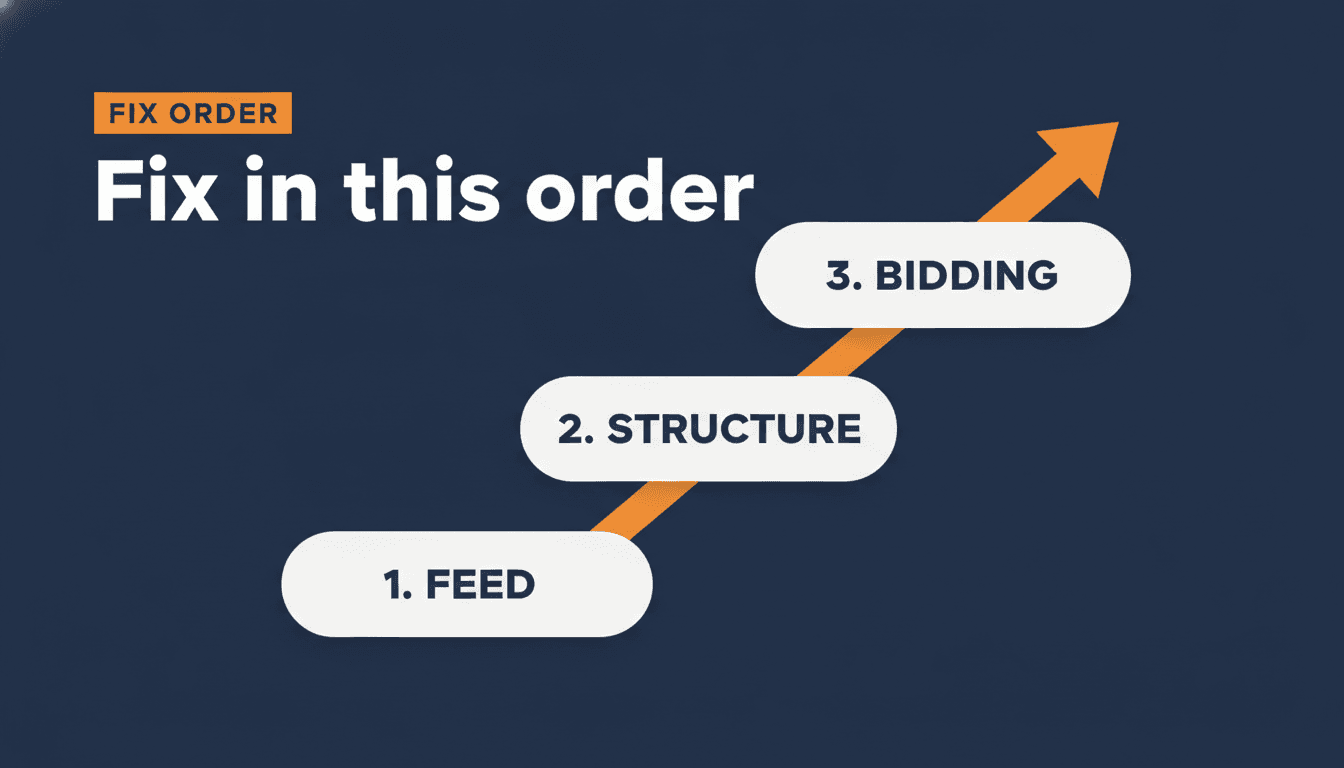
Everything so far has built toward one practical rule, and it is the rule that separates accounts that improve from accounts that just get fiddled with. When Shopping underperforms, fix the chain in order: feed first, then structure, then bidding. The order is not a preference. It is the dependency built into how the system works, because each layer can only operate on what the layer above it delivers.
Feed first
Before anything else, go to Merchant Center and fix the feed. Clear disapprovals, fill missing required attributes, add identifiers, sharpen the titles so they front-load what buyers search, replace weak images. This is the layer that caps every other layer, so it is the one with the most upside and the lowest cost. Raising a bid on a product with a thin title just means paying more to keep losing the same auctions. The demand was already there; a data problem was hiding your products from it. Fixing that is the cheapest performance you will ever buy back.
Structure second
Once the feed is clean and you have conversion data to read, build the structure that lets you treat different products differently: split by intent so your high-value searches get the budget they deserve, and tag by margin so you bid up your earners and pull back on your duds. Structure without a clean feed underneath is just sophisticated organization of products that still cannot compete. Structure on top of a clean feed is how you direct your money with intent.
Bidding last
Only now does bidding earn its place. With a feed that makes you eligible and a structure that groups you sensibly, a Target ROAS set at your real average and tightened in small steps is what scales the account. Bidding is the amplifier at the end of the chain. It makes a working account bigger; it cannot make a broken one work.
Why getting the order wrong is so common, and so costly
The reason almost everyone works this backwards is that the layers are visible in the opposite order of their importance. Bidding has a big obvious slider and instant feedback. Structure feels like strategy. The feed is a quiet file most people set up once and never reopen. So the attention flows to the loud, late links and away from the quiet, decisive one. The result is the most common failure pattern in Shopping: an owner convinced the problem is budget or bidding, twisting the knobs at the end of the chain, while the actual cause sits untouched at the start. Work the order, and you stop treating symptoms.
What to expect
Set expectations before you spend, because the wrong ones cause people to quit a campaign that was about to work.
First, the timeline. Do not expect profit on day one. The opening period is for gathering data, which products move, which searches convert, what a customer actually costs you, and that means accepting some early loss as the price of learning. A realistic shape for a well-run account is losses in the first 30 days, improvement as the data accumulates, and cash-positive somewhere around day 60 to 90 once the feed is clean and bidding has enough conversions to optimize on. The stores that quit in week two never gave the chain a chance to pay off.
Second, the numbers. We set the industry ranges earlier, and the point of them was never the averages themselves but the size of the spread around them. What matters is how far apart the good and bad ends of that spread sit on the very same product, and a worked example shows that better than any range can.
The same product, two outcomes
Say you sell a pair of sunglasses at 80 dollars, with a 40 percent margin, so 32 dollars of profit per sale. You run a 100 dollar daily budget. Watch what feed and campaign quality do to the same product on the same budget.
Poorly set up: a 0.5 percent conversion rate at a 4 dollar cost per click.
- 25 clicks a day
- about 1 sale every 8 days at that conversion rate, so on an average day, well under one sale
- on a day you do convert: 32 dollars of profit against 100 dollars of cost
- you lose money almost every day
Well set up: a 3 percent conversion rate at a 0.80 dollar cost per click.
- 125 clicks a day
- about 4 sales a day
- 128 dollars of profit against 100 dollars of cost
- you make money, and now you have a reason to raise the budget
Same sunglasses. Same 100 dollars. One version quietly drains the account and convinces the owner Shopping does not work for them. The other compounds, because once a campaign is profitable, scaling it is just turning up a budget that already pays back. The difference between the two is not luck and not budget. It is a stronger title, a cleaner image, a feed that clears Merchant Center, sensible structure, and a bid set at a number the account can actually hit, in that order. (Those figures are illustrative, to show the shape of the gap, not numbers from one specific store.)
That gap is the entire argument of this guide, made arithmetic. The feed and the chain behind it are what move a product from the first column to the second.
Scaling: more countries, bigger catalogs
Once a Shopping account is clean and profitable, the question changes from "how do I make this work" to "how do I make more of it." Scaling Shopping mostly means two things: selling into more countries, and managing a catalog large enough that you cannot hand-tune every product. Both are feed problems before they are campaign problems, which by now should sound familiar.
Selling in more countries
Expanding to a new country is appealing because the campaign mechanics carry over: the same chain, the same campaign types, the same bidding logic. What does not carry over for free is the data, and that is where expansions go wrong.
Three things have to be genuinely localized, not just switched on. Currency and price must be correct for each market, including how tax and shipping are shown, because a price that does not match the local landing page is a disapproval in any country. Language matters in the feed, not only on the site: titles and descriptions should be in the market's language so they match how people there actually search, and a machine-translated title that reads oddly will match poorly and convert worse. And shipping and returns settings have to reflect what you really offer in that market, because Shopping shows shipping information and will hold you to it.
The practical approach is to treat each country as its own feed configuration sharing one source of truth, rather than copying one country's feed and hoping. Get one market clean and profitable first, learn what localizing actually costs you in effort, then repeat the pattern. Adding a country multiplies whatever state your feed is in: multiply a clean one and you grow, multiply a messy one and you have now spread the mess across borders.
Managing a large catalog
The second kind of scaling is size. A few dozen products you can curate by hand. A few thousand, or tens of thousands, you cannot, and the instinct to manage them one by one is what breaks at scale. Large catalogs need rules, not manual edits.
This is where two things earn their keep. The first is feed rules and automation: instead of rewriting a thousand titles by hand, you define a rule once, prepend the brand to every title in a category, fill a missing attribute from another field, exclude out-of-stock items, and it applies across the catalog and keeps applying as products change. The second is the custom labels from the structure section, used now at scale: with thousands of products, labels are how you bid by margin tier or product role without touching individual items, because you are bidding on the label, not the product.
There is also a simple discipline that matters more as catalogs grow: do not advertise everything just because you can. A large catalog usually contains a long tail of products that rarely sell, carry thin margins, or have weak data. Pushing budget at all of them dilutes your spend and your data. Concentrate on the products that earn, use exclusions and labels to hold back the rest, and let the winners gather the conversion volume that makes bidding work. Scaling is not "advertise more products," it is "put more behind the products that pay."
The pattern underneath both
Notice that both kinds of scaling come back to the same place. More countries, bigger catalog, the lever is always the feed and the rules that keep it clean at volume. The campaign types and bidding strategies do not change as you grow; they just have more, and more varied, products to work with. Which means the discipline that got you profitable, feed first, is the same discipline that lets you scale without the wheels coming off. The store that scales smoothly is almost always the one that fixed the chain before it tried to make it bigger. Doing this by hand stops being realistic somewhere in the low thousands of products, which is the point where the right tooling and a bit of automation stop being a luxury and start being the only way the feed stays clean.
Free listings: the same feed, no extra spend
There is a part of Google Shopping you do not bid for at all, and most stores leave it sitting on the table. If your feed is clean and your products are approved, they can appear in free product listings across Google. By opting in to what Google calls surfaces across Google, the same Merchant Center feed that powers your paid ads also earns organic visibility on Search, the Shopping tab, Google Images and other surfaces, with no cost per click attached.
The reason this exists at all is the chain. Free listings run on the identical path, store data to feed to Merchant Center, and simply stop short of the final bidding link. Everything you did to make paid Shopping work, the front-loaded titles, the clean images, the correct identifiers, the cleared disapprovals, is exactly what makes free listings work too. You are not building anything new. You are collecting a second return on work you already did. This is the clearest illustration of why feed-first thinking pays twice: one clean feed earns both your paid eligibility and your free presence.
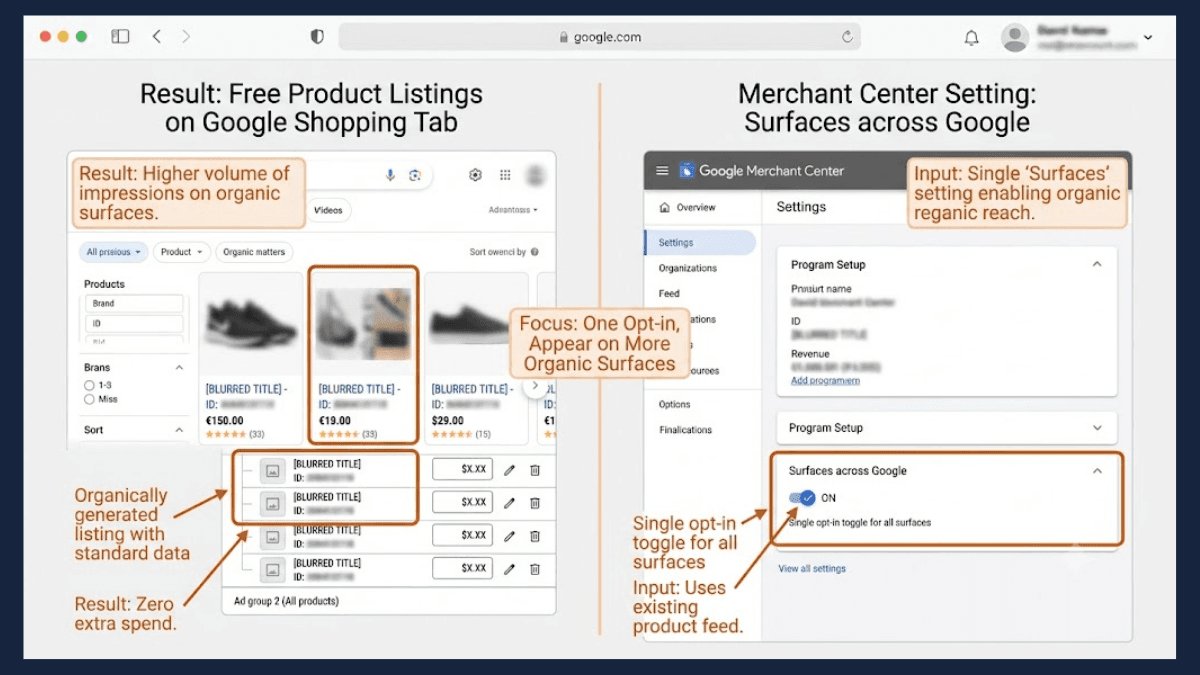
Two honest qualifications keep this in proportion. First, free listings are not a replacement for paid. For most stores, paid Shopping still drives the large majority of clicks and sales, because paid ads sit in the prime positions and free listings take the spots below and around them. Treat free listings as additive, not as a way to stop paying for Shopping. Second, "free" is not "automatic effort-free ranking." Your organic product visibility still depends on feed quality and relevance, the same signals that decide paid eligibility, so a thin feed earns thin free visibility. The work is the feed; the listing is the payoff.
For a store that has already done the feed work, the move is simple: make sure you are opted in to the free listings surfaces in Merchant Center, confirm your products are approved for them as well as for ads, and let the same clean feed do double duty. It is one of the few genuinely free wins in Shopping, and it exists only because you got the chain right in the first place.
The one thing to take away
Google Shopping is not three equal parts. It is a chain, and the feed is the first link: store product data to feed to Merchant Center to auction to bid. Every decision people agonize over, Standard Shopping or Performance Max, which bid strategy, how to structure, how to scale, sits downstream of that first link and is capped by it. Get the chain right, top to bottom, and those decisions get easier and more honest, because you are tuning a system that can actually compete. Get the feed wrong and no budget, no bid strategy, and no campaign type will save you; they will just hide the problem for a while.
So if you take one thing from a guide this long, take the order. Feed first. Then structure. Then bidding. Then scale. It is the difference between an account that compounds and one that gets endlessly fiddled with. And if you would rather not maintain that feed by hand as your catalog grows, the right tools and a bit of automation are what keep the chain clean at volume, once the thinking is yours.
If you want a second pair of eyes on where your own chain is leaking, that is the work I do. I trace the whole path, from your store's product data through the feed to Merchant Center to the auction, and tell you exactly which link is costing you sales, and what to fix first.
Frequently asked questions
How do Google Shopping ads work? Google Shopping ads are visual product ads matched to searches using your product feed data, not keywords you choose. The system has three pieces: a product feed, Google Merchant Center where the feed lives and is checked, and a Google Ads campaign that pulls approved products into auctions. Google reads your feed, decides which searches each product is eligible for, and shows the ad with its image, title, and price.
How much do Google Shopping ads cost, and is $20 a day enough? You pay per click, with no minimum bid or daily budget, so cost depends on your category. Across most ecommerce niches, cost per click runs roughly $0.50 to $1.50, with competitive categories like apparel running higher. A $20 daily budget in a competitive niche may buy only a handful of clicks, which is enough to test your feed setup but not enough data to optimize on conversions reliably or to feed automated bidding. It is a testing budget, not a scaling one.
Standard Shopping or Performance Max, which should I use? In 2026 both are viable, and since October 2024 Performance Max no longer automatically wins over Standard Shopping for the same products in the same account; Ad Rank decides. If you are starting out, begin with Standard Shopping for the control and visibility, learn what converts, then test Performance Max for reach once you have steady conversion data. Many experienced accounts run both.
Why is my Google Shopping campaign not spending or not profitable? The most common cause is a feed problem: disapprovals in Merchant Center, missing identifiers, or titles too thin to match relevant searches. Check the Needs attention tab in Merchant Center before touching budget or bids. A second cause is a Target ROAS target set too high for your conversion volume, which makes the algorithm throttle spend chasing a goal it cannot reach. Work the chain in order: feed, then structure, then bidding.
Do I need a product feed for Google Shopping? Yes. The product feed is the foundation of the entire system; without it Google has no product data to match to searches, so nothing can show, paid or free. The feed lives in Google Merchant Center, which validates it and flags errors. The same feed also powers free organic listings once you opt in to surfaces across Google.
How are Shopping ads different from Search ads? Three ways. Shopping ads are visual, showing an image and price up front, where Search ads are text. Shopping ads are product-specific rather than keyword-based, so you cannot show every product for one broad keyword. And Google matches Shopping ads to searches using your feed data automatically, instead of the keywords you select for Search.
Are Google Shopping free listings worth it? Yes, because they cost nothing beyond work you have already done for paid Shopping. By opting in to surfaces across Google, your existing Merchant Center feed earns organic product visibility across Google surfaces. They will not replace paid, which still drives most clicks and sales, but they are an additive surface that a clean feed earns you for free.
About the author

Auke Jongbloed
Auke Jongbloed is a Google Shopping and product feed specialist. He builds a product feed manager for WooCommerce, and works directly with ecommerce store owners on Google Shopping and Performance Max setups via aukemarketing.com. Follow him on LinkedIn for more on Google Shopping and feed strategy.
Free feed review
Get the 5 biggest fixes for your Shopping feed
Send me your store and I look at your product feed and Merchant Center. Within 3 business days you get the 5 biggest fixes, in plain language. Free, 5 reviews per month, no commitment.
Get your free feed review