How to Optimize Google Shopping Campaigns: Three Layers, One Order
Google Shopping campaigns have no keywords. Everyone knows that. What most guides do not tell you: your feed is your keyword strategy.
What you put in your product title determines which search queries you are eligible for. No keyword tool fixes that. No bid strategy compensates for it. Most stores approach this backwards: they raise bids while the feed is broken, or build campaign structure while basic feed attributes are missing.
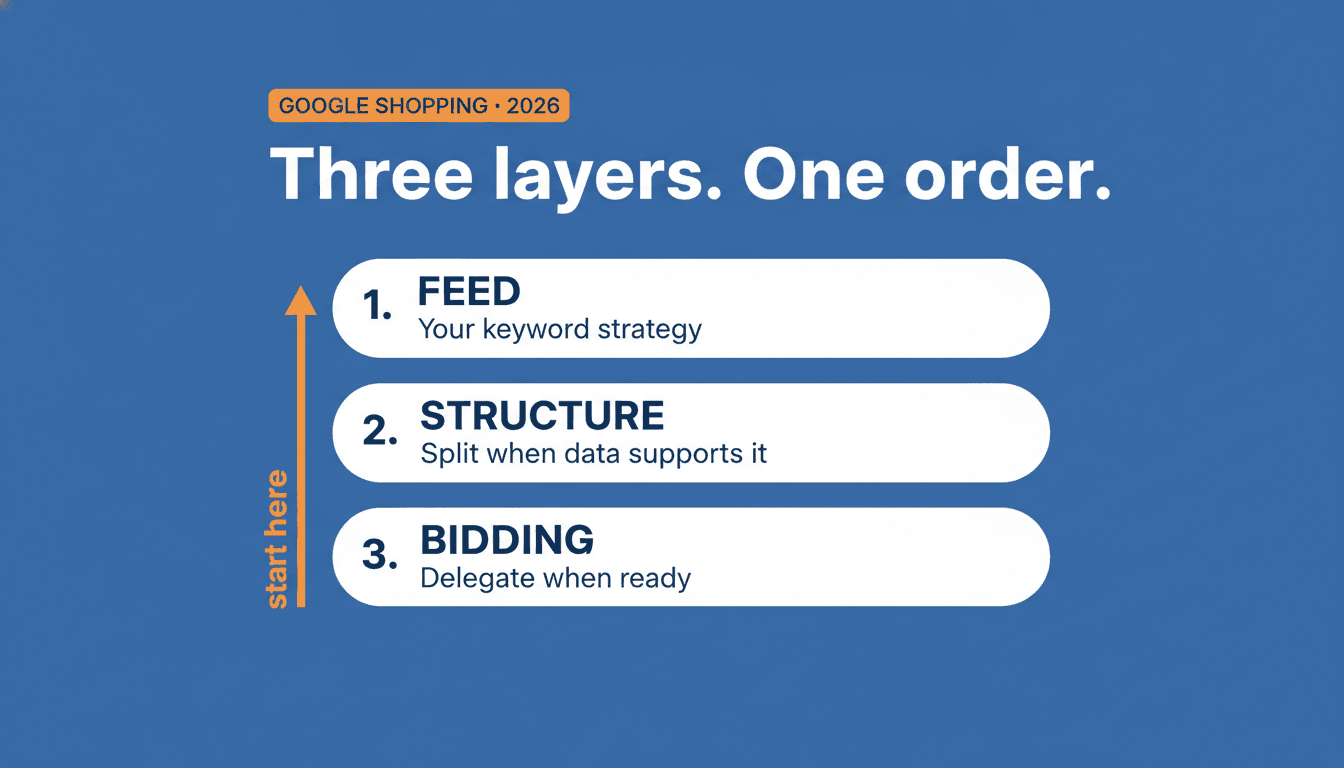
This article explains the three layers of Shopping campaign optimization and the order that actually works. For the full picture of how Shopping fits together, start with the ultimate Google Shopping guide; this piece is the deep dive on the optimization order.
Key insights
- The feed is your keyword strategy. What you put in your product title determines which searches you are eligible for. A campaign change never fixes a feed problem.
- Google uses quality signals in the Shopping auction similar to Quality Score in Search, but they are not visible as a number. Better feed data improves those signals directly.
- Target ROAS only works reliably from 50 conversions per campaign per 30 days. Set your target at your current historical average, not your goal.
- Optimizing structure and bidding while your feed is incomplete means fixing the wrong layer.
How the Shopping auction works
Before changing anything in a campaign, it helps to understand what happens behind the scenes.
Google pulls product data from your feed and decides which searches trigger your ad. There is no manual keyword selection. You do not bid on search terms. Instead, Google calculates an Ad Rank per auction based on two factors: your maximum CPC bid, and a set of quality signals.
Google uses quality signals for Shopping similar to what it calls Quality Score in Search: the relevance of your feed data to the search query, expected click-through rate, and landing page quality. Unlike Search, Shopping does not show a visible score on a 1-10 scale. The signals work, but they are less transparent.
Better feed data improves those signals. Stronger signals increase your impression share, without raising your bid.
The chain looks like this:
product data in your store → feed → Merchant Center → Shopping auction → bid
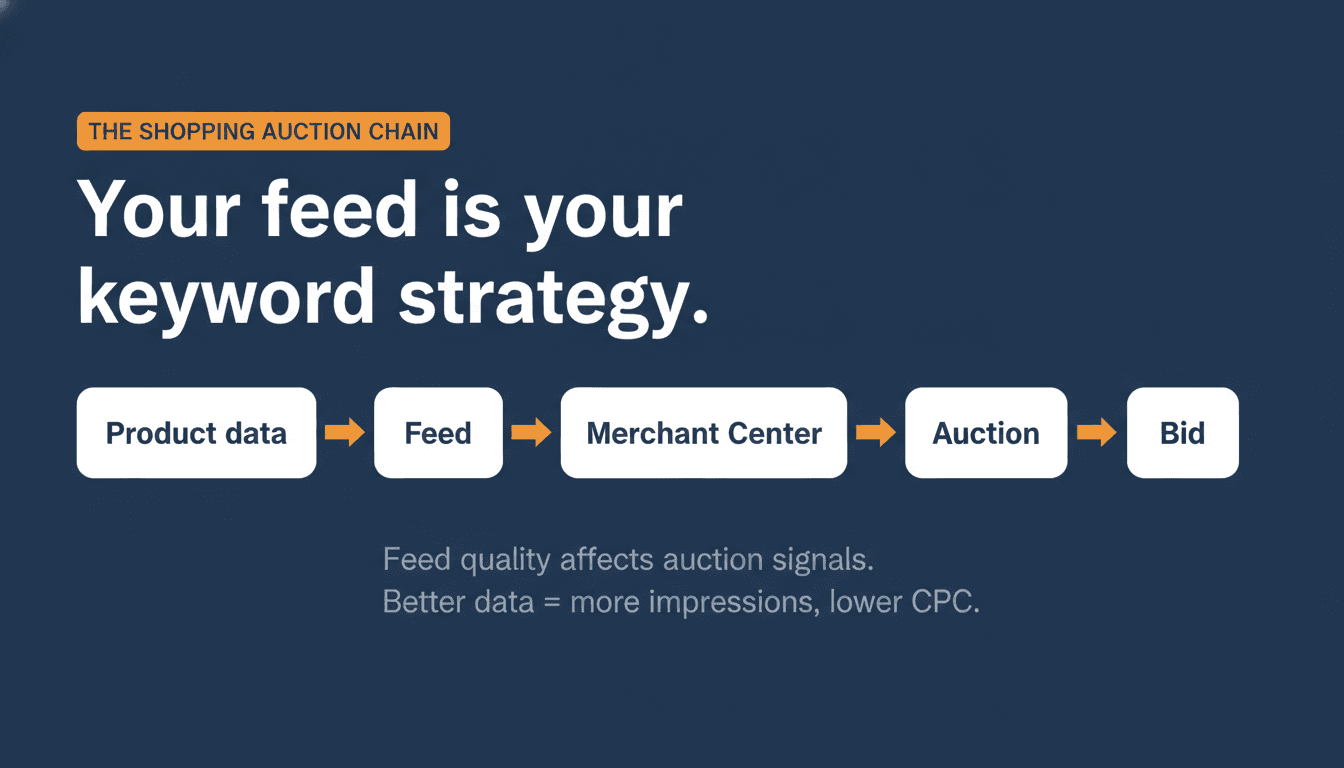
This is the mechanism most campaign optimization guides skip. They start at the campaign. The chain starts at your data.
What that means in practice: the same product, the same campaign, the same bid, but with an optimized title. Average result: +40% impression share, -18% CPC, +25% conversions. Not by spending more. By giving Google better data.
Layer 1: the feed
The feed is the foundation. Everything you do in the other two layers only works well once the feed is solid.
Product titles: the most heavily weighted factor
Your product title is the signal Google uses to match your product to search queries. It is the lever with the highest impact, and the place where most stores leave the most on the table.
A structure that works: [Brand] + [Product type] + [Primary attribute] + [Secondary attributes]
The feed accepts up to 150 characters per title. Google shows around 70 characters on desktop and 50-60 on mobile in the Shopping carousel. Front-load the first 70 characters with your most important match information: brand, product type, primary attribute. The remaining characters contribute to auction matching but are not visible to the user.
The most common mistake is not an extreme one. It is subtle: a product called "Men's running shoe" or "Blue dress." Accurate, but without brand, spec, or variant information. Google has little to match beyond the most generic queries.
Export your best-converting search terms from the Search Terms Report. Check whether those terms appear in your titles. Start with the top 20% of products that drive 80% of revenue. Rewrite titles iteratively from there.
For a deeper look at title structure, what Google does with your title through Product Data Customization, and how to fix your top products using Feed Rules in Merchant Center, see the complete guide to Google Shopping title optimization.
Attributes most stores skip
Beyond the title, several attributes give Google more context that stores routinely leave out:
- GTIN: without a GTIN you miss auctions for branded queries on brands you actually carry.
- product_type: your own taxonomy, separate from Google's category. Helps with campaign segmentation.
- Color, material, size, gender: every missing attribute makes your product harder to compare in auctions.
Each missing attribute is a missing ranking signal in the auction.
Google has also started rolling out newer, optional attributes aimed at AI-driven shopping experiences, popularity_rank among them. They won't fix a broken feed, but once the fundamentals above are solid, see how to calculate popularity_rank automatically in WooCommerce for the next layer worth testing.
Negative keywords: the only direct steering mechanism
You do not choose search terms in Shopping. But you can exclude searches via negative keywords. This is the only direct way to control which queries trigger your ads.
How to use it: analyze your Search Terms Report regularly. Exclude queries that are irrelevant or consistently fail to convert. This lowers wasted spend and raises the relevance of your remaining impressions.
The feed is not a one-time setup
Merchant Center diagnostics run continuously. Products get suspended due to price mismatches between your store and your feed, images that do not meet specs, or missing required attributes. Without monitoring, you lose product impressions silently.
Layer 2: campaign structure
Structure is the second layer. Only relevant once the feed is in order and you have enough conversion data to compare.
When structural changes make sense
One campaign with all products works for small catalogs and gives Google maximum flexibility. The downside: you lose control over which products get more budget.
Multiple campaigns on the same products with priorities is useful when you want a different bid for a subset of products. The highest-priority campaign gets the budget unless its bid is exhausted, then a lower-priority campaign takes over. This is a way to boost seasonal products or promotions without restructuring your entire account.
Split by product group makes sense when you have clear winners and losers. Put winners in a dedicated campaign with higher bids. Losers can be excluded or run with a lower bid.
When structure is not the priority
When your feed is incomplete. When you do not have enough conversion data for a reliable comparison between product groups. And when you do not know which products convert, because then you also do not know how to split them.
Layer 3: bidding strategy
The third layer. Effective only once the two layers below it are working.
Manual CPC or Target ROAS
Enhanced CPC was removed in March 2025. Campaigns using ECPC were automatically migrated to Manual CPC. That leaves two real options: Manual CPC and Smart Bidding, with Target ROAS being the most used variant in Shopping.
Manual CPC gives full control but requires time. Target ROAS delegates bidding decisions to the algorithm, but the algorithm needs data to function well.
When Target ROAS works
Google's technical minimum for Target ROAS is 15 conversions per campaign per 30 days. But that is the absolute floor where the algorithm can technically run. It is not the point where it works well.
A stable threshold: 50 conversions per campaign per 30 days. Below that, Smart Bidding behaves unpredictably and regularly underperforms a well-managed manual bid.
Conversion volume is necessary but not sufficient. Your campaign also needs to have been performing close to your desired ROAS already. Switch with a target of 600% when the campaign historically hits 400%, and the algorithm throttles volume heavily while chasing a target it cannot reach. It does this by lowering bids on impressions it predicts will not hit the target. That turns out to be most of them.
The practical rule for switching
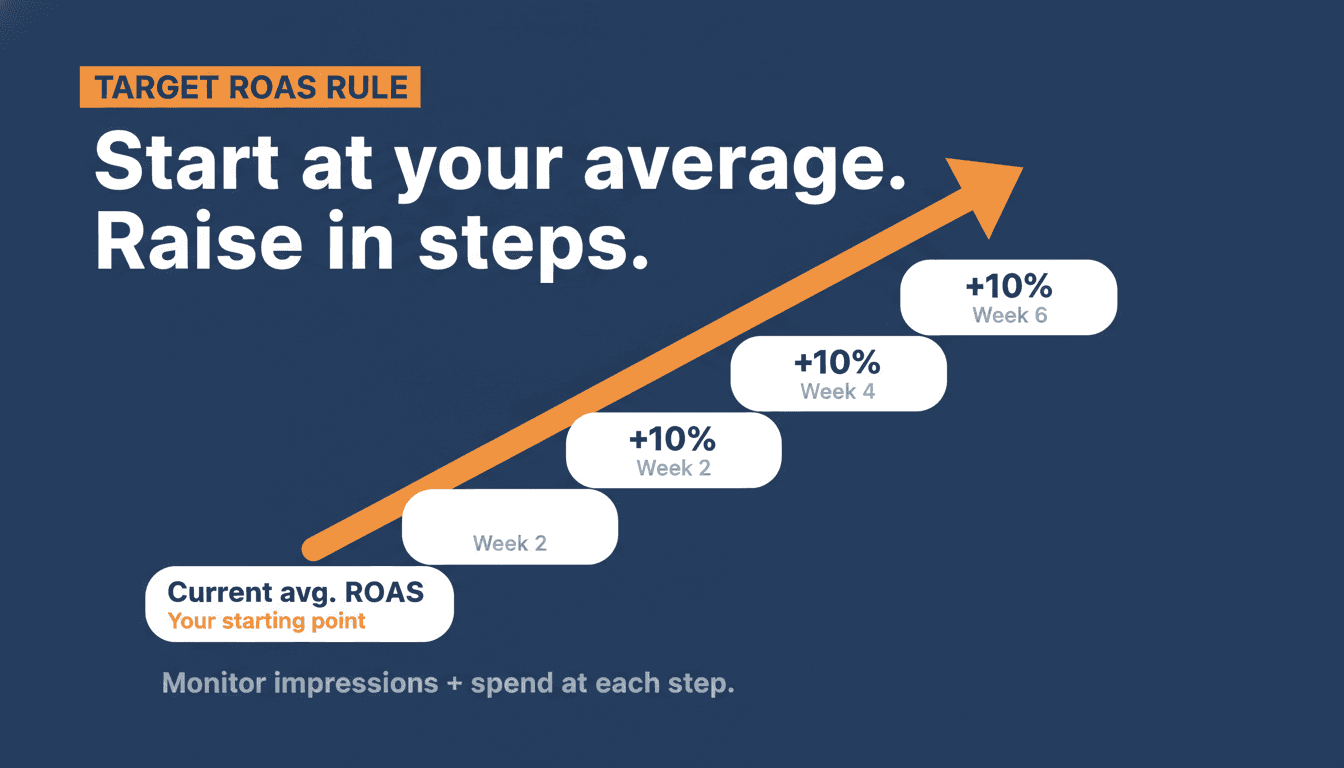
Set your Target ROAS at your current historical average. Not your goal.
Then raise it in increments of around 10% every two weeks. Monitor not just ROAS but also impression share and absolute spend. A rising ROAS alongside falling volume is not a win. It is the algorithm retreating.
The most common mistake
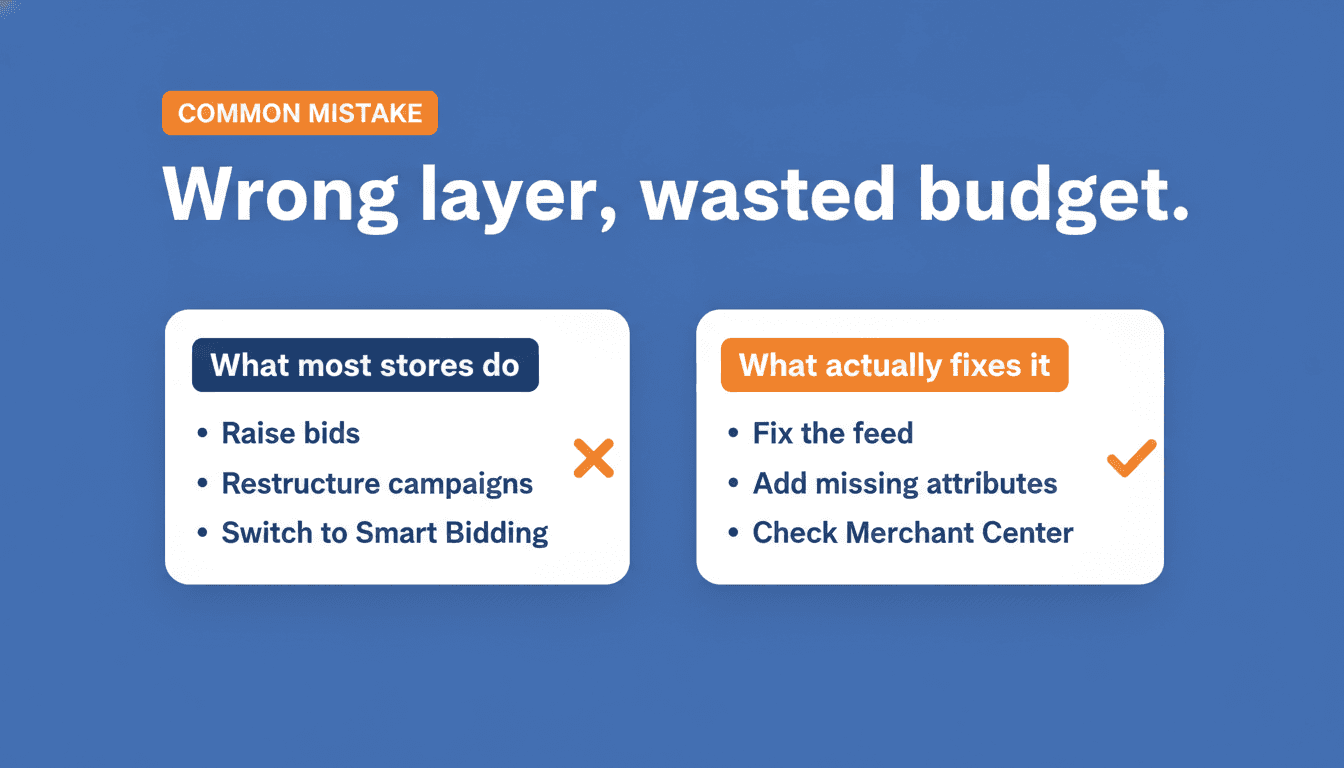
Most stores optimize the wrong layer.
They raise bids while the feed is incomplete. That drives more clicks on products Google already matches poorly to relevant queries. More budget goes toward the wrong searches.
They build campaign structure without enough conversion data for a reliable comparison. They split on instinct, not on data.
They switch to Smart Bidding before the account has enough conversions. The algorithm throttles spend to chase an unreachable target.
The order that works: feed first, then structure, then bidding. Those layers are not equal, and the sequence is not arbitrary.
Where to start if you are starting now
Depending on your situation, the right entry point is different.
Your campaign is not spending its budget. Start with the feed. Check Merchant Center for disapprovals and warnings. Look at your titles for the first 70 characters. GTIN is frequently missing on products with almost no impressions.
Your ROAS is fine but volume is not growing. Structure check. Which products are taking the most budget? Are those also your highest-margin products? Consider splitting out your best-performing categories.
You are adding budget but results are not scaling. Bidding check. Do you have 50+ conversions per campaign per 30 days for Smart Bidding? Is your Target ROAS target realistic given your historical average?
The takeaway
The three layers of Google Shopping optimization are the feed, campaign structure, and bidding strategy. The feed always sits below the other two. Optimizing the wrong layer costs money without return.
Open Merchant Center. Go to diagnostics. Count how many active disapprovals you have, and use the Merchant Center Error Decoder to look up the cause and fix for each one. If that number is above zero, that is the first priority. Not campaign structure. Not bidding strategy.
If you want to understand how a misconfigured Target ROAS target throttles your campaign, read why your Google Ads campaign stops spending. Once your Shopping foundation is solid and conversion volume is consistent, Performance Max for ecommerce is the logical next step.
Frequently asked questions
Why are Google Ads not spending my budget? The most common cause is a feed problem: disapprovals in Merchant Center, products missing a GTIN, or titles that do not match active search queries. Check Merchant Center diagnostics before touching campaign settings or budget. A second cause is a Target ROAS target set too high relative to your conversion volume, which causes the algorithm to throttle back spend in pursuit of a target it cannot reach.
Why is my Google Shopping campaign not spending? New Shopping campaigns often spend slowly because Google needs time to gather auction data for your products. If a campaign is still barely spending after 5-7 days, check for Merchant Center disapprovals first, then verify your bids are high enough to enter auctions, and check that your product titles contain enough relevant terms to match search queries. Feed quality is the most common root cause.
Is $20 a day good for Google Shopping? It depends on your CPC and category. In competitive niches, $20 per day may generate only 5-10 clicks. That is not enough data to optimize on conversions reliably, and it is well below the threshold needed for Smart Bidding. A $20 daily budget is useful for testing your feed setup, but not for scaling. Once your feed is clean and your account shows steady conversions, increasing budget becomes meaningful.
When should I switch from Manual CPC to Target ROAS? When you have at least 50 conversions per campaign in the last 30 days, and your campaign is already performing close to your target ROAS. Set the target at your current historical average, not your ideal. Then raise it in increments of around 10% every two weeks. Switching too early or setting the target too high causes the algorithm to throttle volume heavily.
How do I stop Google Ads from overspending? Google can exceed your daily budget by up to 2x on high-traffic days, but compensates across the month. If you need tighter control, use a shared budget with a monthly cap, or switch to Manual CPC which gives more predictable spend. With Target ROAS, Google takes more budget flexibility to hit your ROAS goal, so daily variation is higher.
About the author

Auke Jongbloed
Auke Jongbloed is a Google Shopping and product feed specialist. He builds a product feed manager for WooCommerce, and works directly with ecommerce store owners on Google Shopping and Performance Max setups via aukemarketing.com. Follow him on LinkedIn for more on Google Shopping and feed strategy.