Feed Software or a Specialist? Fixing Google Shopping
Key insights
- A feed management tool carries out decisions. It doesn't decide which titles, product types, custom labels or exclusions make your catalog profitable.
- Software works on two of the five layers behind a Shopping ad: product data and the feed. Account standing, store pages and tracking sit outside it, and so do most campaign decisions.
- Merchant Center's own attribute rules and supplemental sources, for which Google lists no fee, are often enough for a store on one channel.
- A store with a feed tool and under 1% disapprovals can still stall: without product types or custom labels, its campaigns had no way to separate best-sellers from slow stock.
- Test a tool for one month with a success metric. If it still stalls, buy a scoped diagnosis, not an open-ended retainer.
You have a Shopping problem. Products keep getting disapproved, Merchant Center shows warnings you can't place, or the budget goes out and the sales don't come back. You've spent a few evenings in your feed, watched the tutorials, and you still can't say whether the problem sits in the feed, the campaign or the bids.
That is usually the moment a store owner reaches for a feed management tool, or for someone to fix it. Both are reasonable. Both can be the wrong buy, and I have watched merchants make the expensive choice for perfectly good reasons.
Tool or person is the second question, though. The first one is simpler: where does your problem actually live?
First: which layer is the problem in?
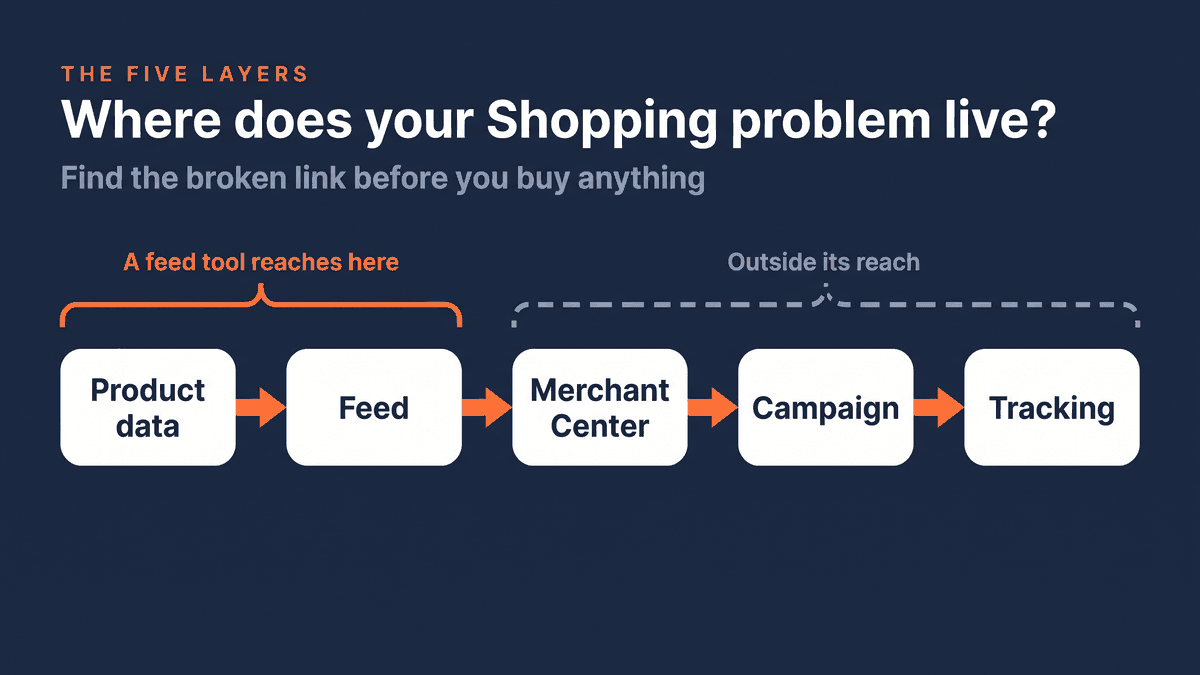
Every Shopping ad sits on a chain. Find the broken link and the choice mostly makes itself.
- Product data. What lives in your store: titles, prices, GTINs, images, variants, stock. Symptom: missing identifiers, vague titles, wrong availability.
- The feed. How that data is mapped and sent to Google. Symptom: attributes in the wrong field, products going live that should be excluded, updates that stop arriving.
- The Merchant Center account. Policies, settings and how far Google trusts your store. Symptom: misrepresentation warnings, account-level suspensions.
- The campaign. How Shopping or Performance Max groups, prioritizes and bids on your products. Symptom: products approved, budget going to the wrong ones.
- Tracking. What Google learns about which clicks turn into sales. Symptom: you can't tell which products make money, and neither can Google's bidding.
A feed management tool works on the first two layers, and that is where it is strong. Some tools add campaign automation on top, but your account standing, the store pages Google checks and your tracking sit outside their reach, no matter how many rules you add.
Route 0: what Merchant Center already gives you
Before you pay for anything, look at what Google already gives you. Merchant Center is free, and once you switch on the "Advanced data source management" add-on, you get two tools that, in the accounts I review, are rarely in use. You find it under the add-ons in your settings, and Google lists no separate fee for it.
Attribute rules, formerly feed rules, change your data on the way in: put the brand in front of every title, fill an empty field, replace a wrong value. Supplemental data sources let you add or overwrite specific attributes, such as custom labels, from a Google Sheet without touching your store. They can't add or remove products, only enrich the ones you already send.
For a store that advertises on Google only, with a catalog you can still oversee, that often covers what people buy a feed tool for. It gets stuck on scale and on other channels: rules for one destination, maintained by hand, in an interface Google has renamed more than once.
Route 1: what a feed management tool is good at
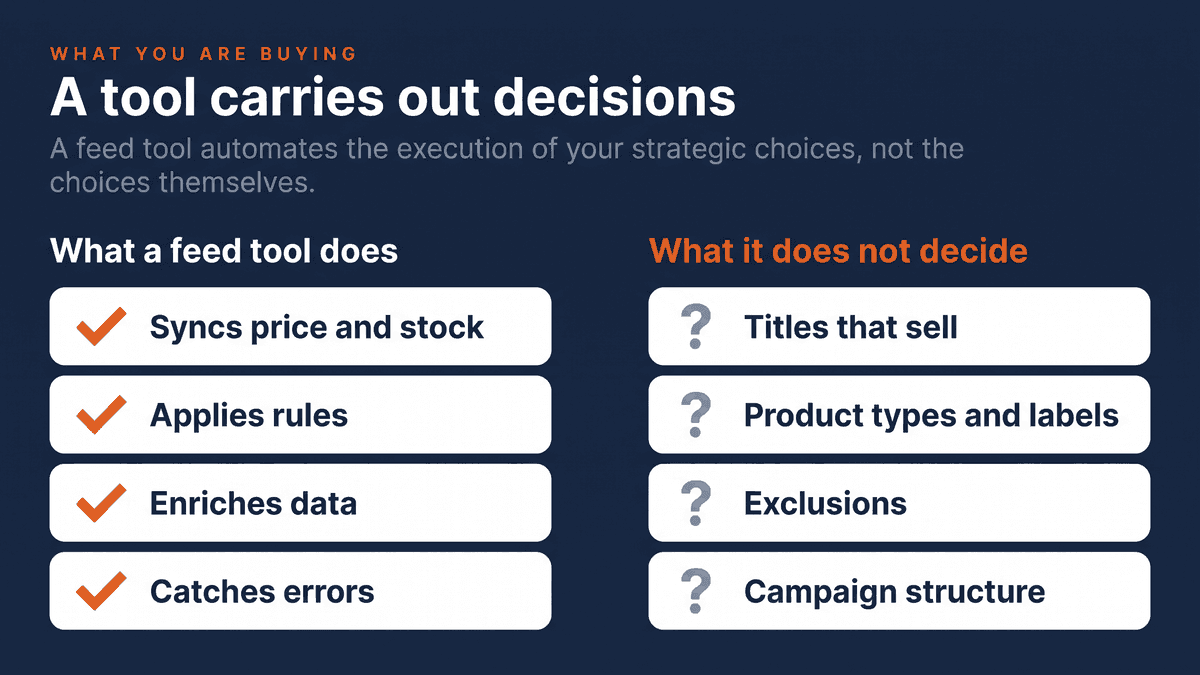
A feed management tool earns its money when the problem is data at scale: thousands of products, prices and stock that change daily, often more than one channel. A good tool does four things well:
- It keeps price and stock in sync with your checkout.
- It applies rules so every title, category and attribute follows the same pattern.
- It enriches data your store doesn't hold in the right shape, such as a product type or custom label.
- It catches avoidable disapprovals before Google does.
The cost is easy to compare, an honest advantage of software. Entry-level plans of the well-known tools ran from roughly €30 to $100 a month in October 2026, and the price climbs with your number of products and channels.
But understand what you are buying. The tool automates and manages the feed. It does not decide which attributes, titles, product types, custom labels, exclusions or campaign structure make your catalog profitable. Someone still has to make those calls, and someone has to notice when a mapping change quietly sends the wrong products live.
A tool carries out decisions. It doesn't make them.
The part the tool lists leave out: where software runs out of road
The "best feed management tools" lists I read for this article stop at features. They don't say what happens when the problem lives in layers three to five. Examples I run into regularly:
Misrepresentation
The account is warned or suspended, and the feed is clean. Google's own instruction for this policy is to update your website: how clearly you show who you are as a business, what the full cost is including taxes and fees, and whether you can deliver what you list. No feed rule reaches those pages.
Campaign structure
Every product is approved, but best-sellers and dead stock sit in one campaign, and in my experience the budget drifts to whatever Google finds easiest to sell. That is a campaign structure problem, not a feed problem.
Tracking
Smart Bidding bids on how likely a click is to convert, and on what that conversion is worth. If purchases are not recorded properly, or every order reports the same value, the bidding has nothing to tell a big order from a small one. Google itself asks for at least two different conversion values. A feed tool can't see that.
Feeds that quietly stop updating
Google switched off the Content API for Shopping on 18 August 2026, with errors building since 1 September. A tool or integration that never moved to the Merchant API can look fine on your side while Google stops receiving your changes.
The vendors know this
One of the best-known tools sells its software next to a managed service from $750 and a coaching add-on of $450 a month with a dedicated feed expert. A price list with a human on it tells you the tool alone is not enough for every customer.
The most expensive mistake I see is a store owner paying every month for a feed tool to fix something that was never a feed problem.
Route 2: a specialist, but scoped
A specialist gives you a diagnosis plus repairs: someone who has seen your problem before goes through the whole chain and fixes what is actually broken. The risk is the shape of the deal. An open-ended retainer keeps billing whether your problem still exists or not.
So if you hire a person, buy a defined piece of work with an end date. That is how I set up my own Google Shopping Fix: a 30-day project for one published price, €1,500 excl. VAT, with the first three stores paying €990 excl. VAT in exchange for a case study. It covers the feed, Merchant Center, a misrepresentation check, a Merchant API check, the Shopping structure and tracking. The first fixes go live within 14 days, and it ends with a written handover, so you own the account when it's done.
Be clear about what an honest specialist can and can't promise. I guarantee that every feed-related disapproval is fixed within 30 days, or I keep working for free until it is. I don't guarantee reinstatement after a suspension, because that is Google's decision. Anyone who promises it is selling the appeal, not the fix.
The case: a pet clinic spending €2,200 a month
A pet clinic's web store asked me for a review this month. Around €2,200 a month on Shopping, room in the budget to spend more, and one complaint: "I can't seem to scale up a lot."
The first thing I checked was disapprovals. There were six, under 1% of the catalog. Not the brake.
The store already used a feed tool, and had built a separate feed for every category. What nobody had decided was what those feeds should say. Of the 353 products I checked, none had a product type or a custom label. 170 had no Google product category in the feed, and in the horse range 121 of 129 were empty. 25 products sat in two feeds at once, and one feed was empty.
Google still guesses a category from the title and description, but the store had given its campaigns nothing of its own to separate a dog shampoo from a horse supplement, or a best-seller from slow stock. My read: without that split, the budget couldn't follow what sells. The bids looked like the problem, but I see them as the consequence. The brake is feed quality and coverage plus structure: not enough well-matched products and conversion data for Google to scale on. The tool was there. The decisions weren't.
How to choose: run a one-month test first
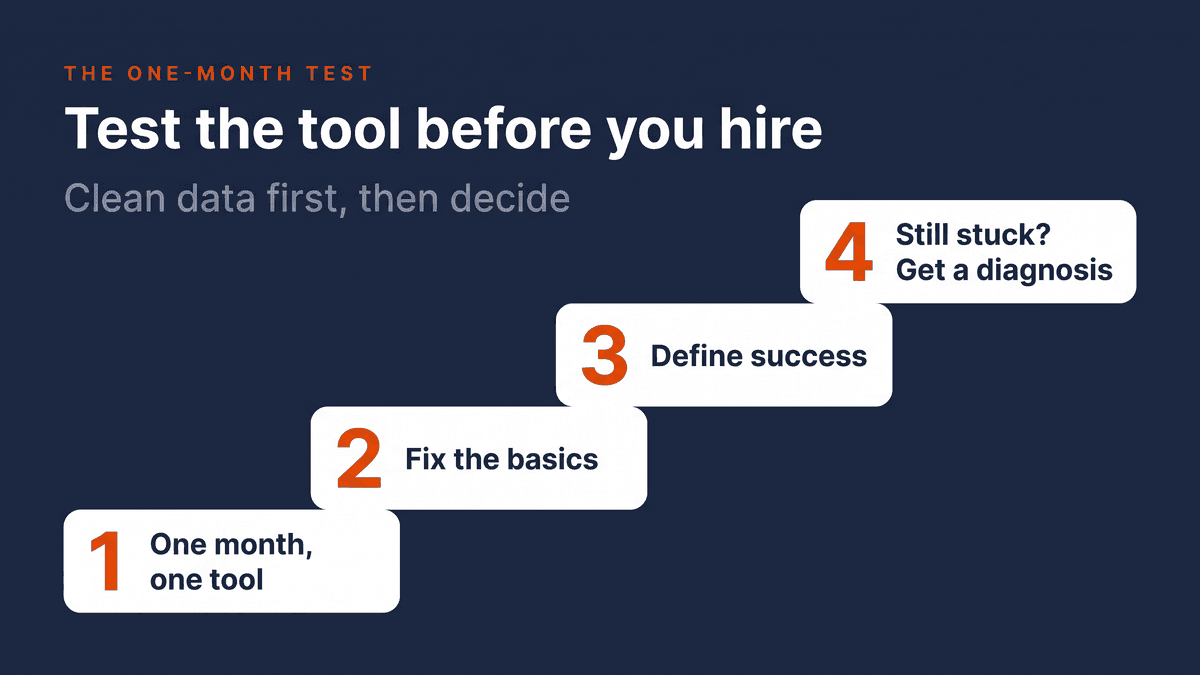
If you are comfortable doing the setup and diagnostics yourself, start with the tool. Run it as a structured test, not a subscription you forget about.
- Buy the tool and give it one month. Put the end date in your calendar.
- Fix the basics first. Titles, GTINs, images, availability, product type, variants, and exclusions for out-of-stock products.
- Define success before you start. For example: keep ROAS steady while conversions, impression share or revenue go up.
- If it still stalls, get a diagnosis. Clean data and a sensible structure that still don't move the numbers point to layers three to five. Bring in a specialist for a defined piece of work at that point, not an open-ended retainer.
That way you spend one month of an entry-level tool to learn whether the problem is fixable in-house, instead of €1,500 before you know whether you can carry out the recommendations.
There is one exception. If you already spend €2,200 or more a month on ads, one month of poor feed decisions can cost more than the specialist fee. At that level, weigh the test month against the fee before you start it.
The practical summary
Before you buy either, write down the one symptom that costs you most. If it sits in your product data or feed, a tool, or even Merchant Center's own rules, will probably get you there.
If you can't name it, that is your answer. You need a diagnosis before you need a tool. That is what the free feed review below is for: I look at your feed and Merchant Center and send you the three to five biggest fixes, in plain language, within three business days.
Frequently asked questions
What is feed management? Feed management is the work of turning the product data in your store into a feed that Google and other channels accept and can match to searches: mapping fields, applying rules, keeping price and stock in sync, and catching errors before they turn into disapprovals. A feed management tool automates that work. It does not decide which titles, categories, custom labels or exclusions make your catalog profitable.
What is feed optimization? Feed optimization is improving the content of your feed so your products show for the right searches and can be grouped sensibly in your campaigns. In practice that means clear titles, a correct Google product category, a product type, GTINs and brand, and custom labels you can split campaigns on. In my experience, missing product types and custom labels are a common reason a Shopping account can't scale, even when almost nothing is disapproved.
How much does it cost to hire a Google Shopping specialist? In my experience, agencies rarely publish their fees, and most charge a monthly retainer or a percentage of ad spend. A fixed-price project is the alternative: my 30-day Google Shopping Fix costs €1,500 excl. VAT, one time. Compare that with feed software, where entry-level plans ran from roughly €30 to $100 a month in October 2026, and with what one month of misdirected ad spend costs you.
Does Google Merchant Center have an API? Yes. The Merchant API is Google's current way for software to send product data to Merchant Center. Its predecessor, the Content API for Shopping, was switched off on 18 August 2026, with errors increasing from 1 September and a full shutdown expected in early 2027. If your feed tool or integration never moved to the Merchant API, your product updates may no longer reach Google.
What are 5 key fields to optimize in a Merchant Center product feed? Google has no official top five, but in my work these fields decide most about whether a product shows and for which searches: the title, price and availability that match your product page, GTIN and brand, the Google product category plus your own product type, and custom labels you can split campaigns on. Fix them on your best-selling products first, then work down the catalog.
About the author

Auke Jongbloed
Auke Jongbloed is a Google Shopping and product feed specialist. He builds a product feed manager for WooCommerce, and works directly with ecommerce store owners on Google Shopping and Performance Max setups via aukemarketing.com. Follow him on LinkedIn for more on Google Shopping and feed strategy.
Free feed review
Get the 5 biggest fixes for your Shopping feed
Send me your store and I look at your product feed and Merchant Center. Within 3 business days you get the 5 biggest fixes, in plain language. Free, 5 reviews per month, no commitment.
Get your free feed review